> ## Documentation Index
> Fetch the complete documentation index at: https://stratengineai.com/docs/llms.txt
> Use this file to discover all available pages before exploring further.
# Strategy plans
> Compare the Free, Essential and Professional strategy plans: frameworks, analysis depths, result tabs, Proposal Builder, file limits, and how to upgrade.
StratEngine's strategy side has three subscription plans. **Free** includes 4 frameworks at Quick Scan depth. **Essential** includes 13 frameworks, adds Standard depth and the Momentum tab. **Professional** includes all 29 frameworks, all three depths, the Assumptions tab and the Proposal Builder. Paid plans start with a 7-day free trial. For prices, see [stratengineai.com/#pricing](https://stratengineai.com/#pricing).
Only a workspace admin can start, change or cancel a subscription, because the plan covers the whole workspace. If you'd rather pay per analysis than subscribe, see [Pay-as-you-go](/docs/strategy/billing/pay-as-you-go).
## Compare plans
| | Free | Essential | Professional | Pay-as-you-go |
| - | - | - | - | - |
| Frameworks | 4 | 13 | All 29 | All 29, priced per run |
| [Analysis depths](/docs/strategy/analysis-depth) | Quick Scan | Quick Scan, Standard | Quick Scan, Standard, Deep | All three, priced per run |
| **Momentum** tab | No | Yes | Yes | When you run at Standard or Deep |
| **Assumptions** tab | No | No | Yes | When you run at Deep |
| [Proposal Builder](/docs/strategy/proposals) | No | No | Yes | No |
| Private document limit ([synced and uploaded](/docs/account/folder-sync#file-limits-by-plan)) | 500 files / 2 GB | 10,000 files / 30 GB | 50,000 files / 150 GB | 5,000 files / 15 GB |
The four Free frameworks are SWOT, Marketing 4Ps, 3C's and Business Model Canvas. Essential adds 9 more, and Professional adds the remaining 16. The [framework library](/docs/strategy/frameworks/index) lists every framework and the plan it needs.
The **Momentum** and **Assumptions** tabs follow the depth an analysis ran at. Standard produces momentum, and Deep produces momentum and assumptions. On a subscription, a framework you generate runs at the deepest depth your plan includes. See [Work with framework results](/docs/strategy/framework-results).
## What each paid plan lists
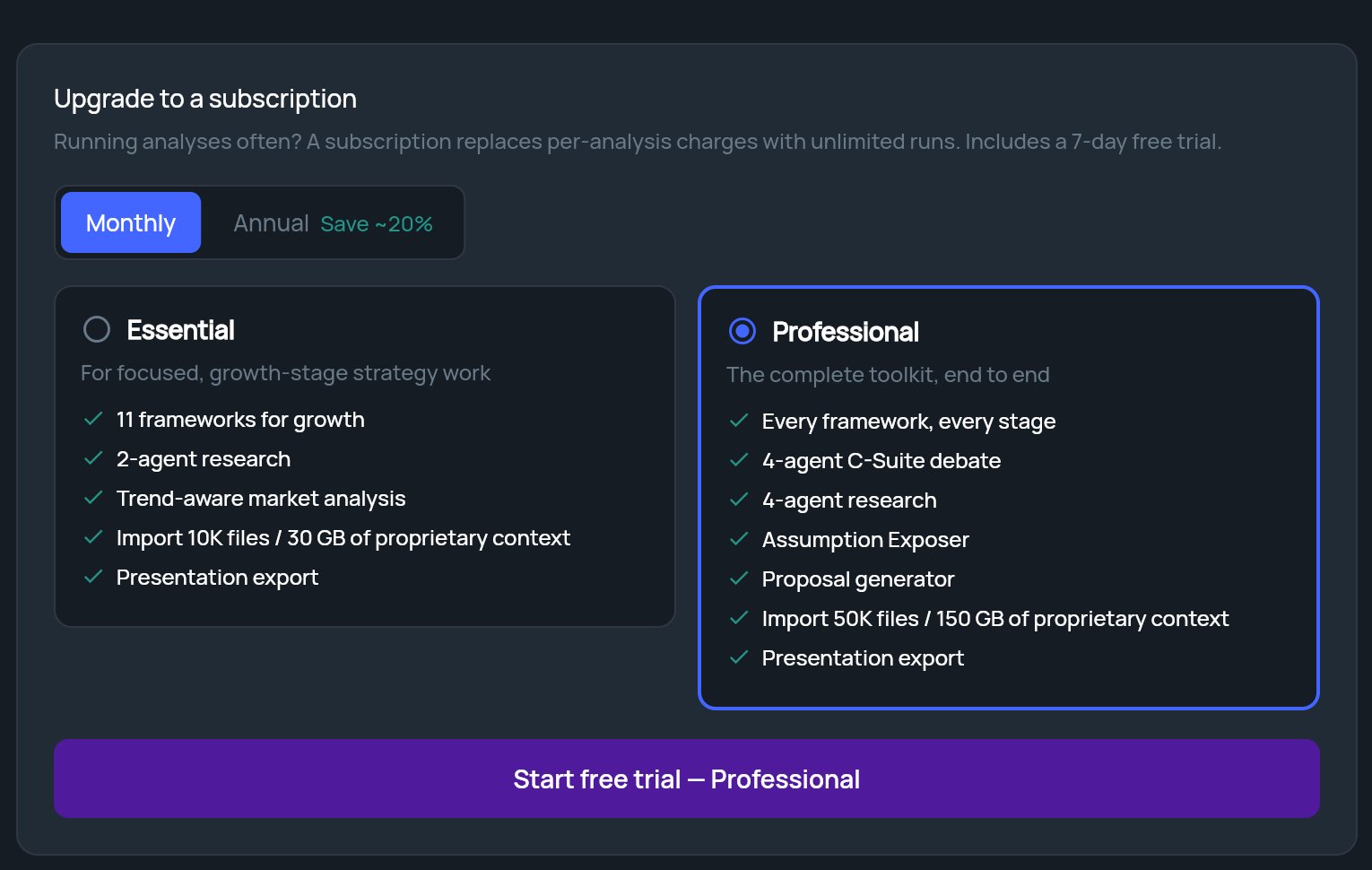
When you choose a plan in **Settings**, each option describes itself this way:
| Essential: **For focused, growth-stage strategy work** | Professional: **The complete toolkit, end to end** |
| - | - |
| 13 frameworks for growth | Every framework, every stage |
| 2-agent research | 4-agent research |
| Trend-aware market analysis | 4-agent C-Suite debate |
| Import 10K files / 30 GB of proprietary context | Assumption Exposer |
| Presentation export | Proposal generator |
| | Import 50K files / 150 GB of proprietary context |
| | Presentation export |
In the app, "Trend-aware market analysis" is the **Momentum** tab, "Assumption Exposer" is the **Assumptions** tab, the "C-Suite debate" is part of a Deep analysis, and "Proposal generator" is the **Proposal Builder**. The import limits are the private document limits in the table above.
## The 7-day free trial
Upgrading from inside StratEngine starts a 7-day free trial of the plan you pick. The buttons that start one say **Start free trial**. Checkout opens in a new browser tab, where you enter your payment details. When you come back, StratEngine picks up your new plan.
## Upgrade from pay-as-you-go
Click **Settings** in the side menu and scroll to **Billing & Account Management**. Pay-as-you-go accounts see an **Upgrade to a subscription** card.
Click **Monthly** or **Annual**. **Annual** shows **Save \~20%**.
Click **Essential** or **Professional**. Professional is selected to start with.
Click the **Start free trial** button. It names the plan you picked. Checkout opens in a new tab.
If you aren't an admin, the card shows **Only an admin can start a subscription. Ask your account admin to upgrade.** and the options are greyed out.
 ## Upgrade from the StratEngine website
When you pick a Strategy plan on [stratengineai.com](https://stratengineai.com/#pricing), you sign in to the app first, and checkout then opens for your own workspace. New accounts see **Setting up your account...** before checkout opens. If you've already finished onboarding, checkout opens when Home loads.
* If your workspace already has a paid plan, your billing portal opens instead, so you can change the plan there.
* If you aren't an admin, you'll see **Ask your admin to upgrade.**
## Upgrade from Free or Essential
There are several ways in, depending on where you are:
* **Settings:** under **Billing & Account Management**, admins click **Manage Account**. Your billing portal opens in a new tab, where you can change your plan.
* **A locked framework:** on [Generate a framework](/docs/strategy/generate-framework), frameworks outside your plan show **Upgrade** instead of **Select**. Clicking it opens your billing portal. If you aren't an admin, you'll see **Only an admin can manage billing.**
* **A locked tab:** on a framework's results, click the locked **Momentum** or **Assumptions** tab, or the **Start free trial** link next to **Momentum Analysis requires Essential tier** (or **Assumptions requires Professional tier**). This opens checkout for that plan with a free trial. Non-admins see **Admin Access Required** instead.
* **A locked depth:** in Strategy Builder or the strategy brief form, click a locked depth and then **View plans**. On Free this offers checkout for the plan that includes the depth; on Essential, admins go to the billing portal and members see **Ask your admin to upgrade.** See [Analysis depth](/docs/strategy/analysis-depth#locked-depths).
## Manage or cancel your subscription
In **Settings**, under **Billing & Account Management**, click **Manage Account** to open your billing portal in a new tab. Use it to update your payment details, change your plan or cancel. When you return, StratEngine checks for changes and updates your plan. Pay-as-you-go accounts don't have **Manage Account**; they upgrade through the **Upgrade to a subscription** card.
Cancelling doesn't delete your account or your work. See [Log out, cancel, or delete your account](/docs/account/delete-account#cancel-a-subscription).
## Related
* [Pay-as-you-go](/docs/strategy/billing/pay-as-you-go)
* [Analysis depth](/docs/strategy/analysis-depth)
* [Work with framework results](/docs/strategy/framework-results)
* [Transfer billing ownership](/docs/account/transfer-billing)
## Related topics
- [Run Digital Marketing GTM Strategy in StratEngine](/docs/strategy/frameworks/digital-gtm.md)
- [Analysis depth](/docs/strategy/analysis-depth.md)
- [FAQ](/docs/account/faq.md)
- [Run Blue Ocean Strategy in StratEngine](/docs/strategy/frameworks/blue-ocean.md)
- [Run Kotter 8 Step Change Process in StratEngine](/docs/strategy/frameworks/kotter-8-step-change-process.md)
This documentation is built and hosted on [Mintlify](https://mintlify.com), a developer documentation platform.
## Upgrade from the StratEngine website
When you pick a Strategy plan on [stratengineai.com](https://stratengineai.com/#pricing), you sign in to the app first, and checkout then opens for your own workspace. New accounts see **Setting up your account...** before checkout opens. If you've already finished onboarding, checkout opens when Home loads.
* If your workspace already has a paid plan, your billing portal opens instead, so you can change the plan there.
* If you aren't an admin, you'll see **Ask your admin to upgrade.**
## Upgrade from Free or Essential
There are several ways in, depending on where you are:
* **Settings:** under **Billing & Account Management**, admins click **Manage Account**. Your billing portal opens in a new tab, where you can change your plan.
* **A locked framework:** on [Generate a framework](/docs/strategy/generate-framework), frameworks outside your plan show **Upgrade** instead of **Select**. Clicking it opens your billing portal. If you aren't an admin, you'll see **Only an admin can manage billing.**
* **A locked tab:** on a framework's results, click the locked **Momentum** or **Assumptions** tab, or the **Start free trial** link next to **Momentum Analysis requires Essential tier** (or **Assumptions requires Professional tier**). This opens checkout for that plan with a free trial. Non-admins see **Admin Access Required** instead.
* **A locked depth:** in Strategy Builder or the strategy brief form, click a locked depth and then **View plans**. On Free this offers checkout for the plan that includes the depth; on Essential, admins go to the billing portal and members see **Ask your admin to upgrade.** See [Analysis depth](/docs/strategy/analysis-depth#locked-depths).
## Manage or cancel your subscription
In **Settings**, under **Billing & Account Management**, click **Manage Account** to open your billing portal in a new tab. Use it to update your payment details, change your plan or cancel. When you return, StratEngine checks for changes and updates your plan. Pay-as-you-go accounts don't have **Manage Account**; they upgrade through the **Upgrade to a subscription** card.
Cancelling doesn't delete your account or your work. See [Log out, cancel, or delete your account](/docs/account/delete-account#cancel-a-subscription).
## Related
* [Pay-as-you-go](/docs/strategy/billing/pay-as-you-go)
* [Analysis depth](/docs/strategy/analysis-depth)
* [Work with framework results](/docs/strategy/framework-results)
* [Transfer billing ownership](/docs/account/transfer-billing)
## Related topics
- [Run Digital Marketing GTM Strategy in StratEngine](/docs/strategy/frameworks/digital-gtm.md)
- [Analysis depth](/docs/strategy/analysis-depth.md)
- [FAQ](/docs/account/faq.md)
- [Run Blue Ocean Strategy in StratEngine](/docs/strategy/frameworks/blue-ocean.md)
- [Run Kotter 8 Step Change Process in StratEngine](/docs/strategy/frameworks/kotter-8-step-change-process.md)
This documentation is built and hosted on [Mintlify](https://mintlify.com), a developer documentation platform.