> ## Documentation Index
> Fetch the complete documentation index at: https://stratengineai.com/docs/llms.txt
> Use this file to discover all available pages before exploring further.
# Finding your way around
> The strategy side menu, what Home shows and when, searching your generated files, the pay-as-you-go balance chip, Settings and Feedback & Help.
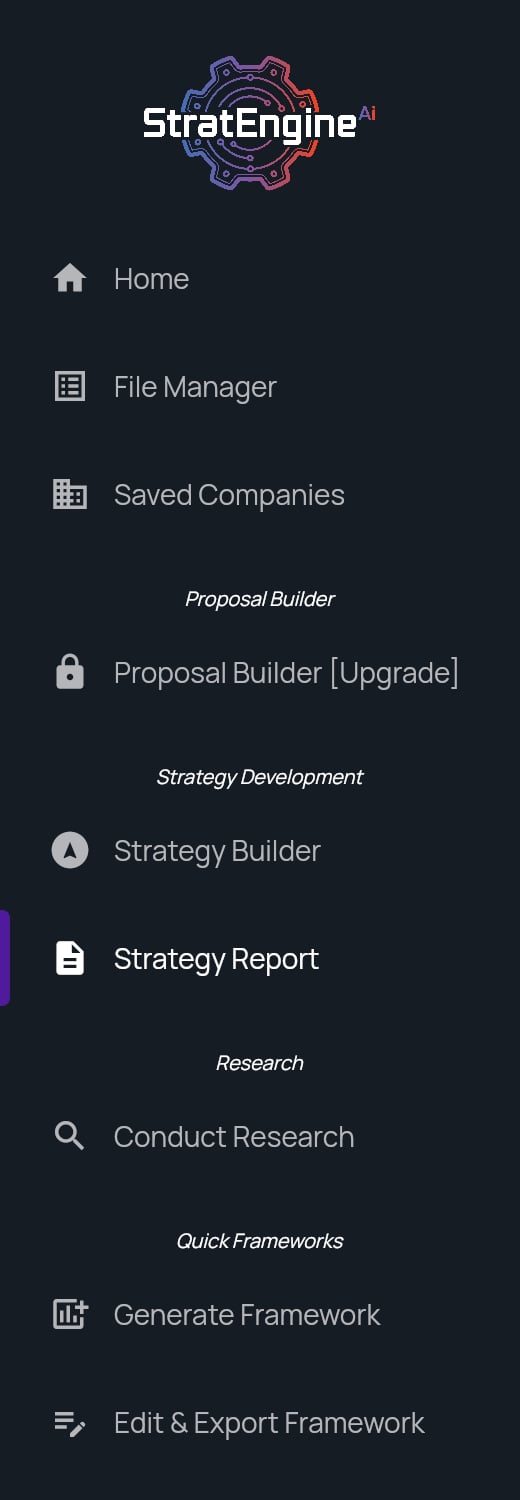
A strategy workspace has a side menu on the left, a header at the top right with search and settings, and a Home page that changes with how much you've done. The side menu groups tools into **Proposal Builder**, **Strategy Development**, **Research** and **Quick Frameworks**. A few items only appear once you've opened something they apply to.
## Side menu
 Click the StratEngine logo at the top of the menu to return to Home from anywhere.
| Section | Item | What it opens |
| - | - | - |
| (top) | **Home** | Your Home page |
| | **File Manager** | Everything you've generated: briefs, frameworks, proposals, research and decks. See [File Manager](/docs/strategy/file-manager). |
| | **Saved Companies** | The companies your workspace has saved for reuse. See [Saved companies](/docs/strategy/saved-companies). |
| Proposal Builder | **Proposal Builder** | Start a new client proposal. See [Client proposals](/docs/strategy/proposals). |
| | **Edit & Export Proposal** | The proposal you have open. Appears only after you open or create a proposal. |
| Strategy Development | **Strategy Builder** | Start a new strategy brief by conversation or form. See [Use the Strategy Builder](/docs/strategy/strategy-builder). |
| | **Strategy Report** | The strategy brief you have open. Appears after you open a strategy brief from Home, File Manager or search. |
| Research | **Conduct Research** | Start a research report. See [Research reports](/docs/strategy/research). |
| Quick Frameworks | **Generate Framework** | Run a single framework. See [Generate a framework](/docs/strategy/generate-framework). |
| | **Edit & Export Framework** | The results view of the framework or brief you have open. Appears only after you open or generate one. |
| (bottom) | **Feedback & Help** | Support, feedback and legal links |
| | **Settings** | Workspace, billing and account settings |
The app's version number is shown at the bottom of the menu. Include it when you report a problem.
**Proposal Builder** needs the Professional plan. On other plans, including pay-as-you-go, the menu shows **Proposal Builder \[Upgrade]** with a lock, and clicking it shows an upgrade window instead. See [Strategy plans](/docs/strategy/billing/plans) and [pricing](https://stratengineai.com/#pricing).
## Home
Home greets you differently depending on what you've done so far.
| When | What you see |
| - | - |
| You haven't created anything yet | **Let's start with your first strategy.** and a **Build your first strategy** button, plus **Watch the 1-minute walkthrough** |
| You have one or two recent items | **Keep going** with a large card for your latest item and a **Continue** button, then **Start something else** |
| You have three or more recent items | **Welcome back** with the shortcut tiles, then **Pick up where you left off** with your three latest items |
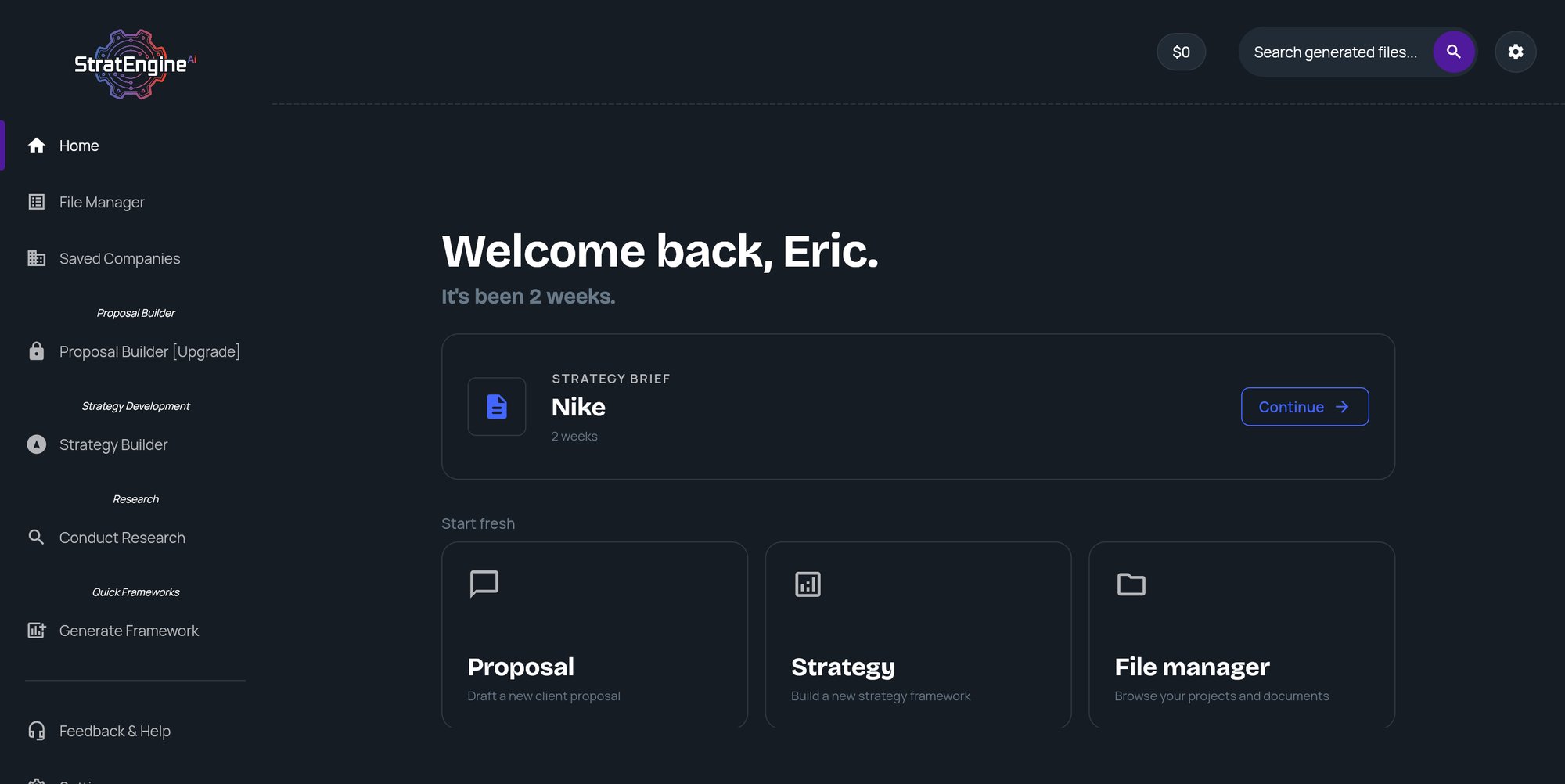
| Your latest item is two weeks old or more | **Welcome back** and how long it's been, a card to continue your latest item, then **Start fresh** |
Click any recent item to reopen it. Each shows its type (**Framework**, **Proposal**, **Research**, **Strategy brief** or **Presentation**), the company, and when it was last touched.
Click the StratEngine logo at the top of the menu to return to Home from anywhere.
| Section | Item | What it opens |
| - | - | - |
| (top) | **Home** | Your Home page |
| | **File Manager** | Everything you've generated: briefs, frameworks, proposals, research and decks. See [File Manager](/docs/strategy/file-manager). |
| | **Saved Companies** | The companies your workspace has saved for reuse. See [Saved companies](/docs/strategy/saved-companies). |
| Proposal Builder | **Proposal Builder** | Start a new client proposal. See [Client proposals](/docs/strategy/proposals). |
| | **Edit & Export Proposal** | The proposal you have open. Appears only after you open or create a proposal. |
| Strategy Development | **Strategy Builder** | Start a new strategy brief by conversation or form. See [Use the Strategy Builder](/docs/strategy/strategy-builder). |
| | **Strategy Report** | The strategy brief you have open. Appears after you open a strategy brief from Home, File Manager or search. |
| Research | **Conduct Research** | Start a research report. See [Research reports](/docs/strategy/research). |
| Quick Frameworks | **Generate Framework** | Run a single framework. See [Generate a framework](/docs/strategy/generate-framework). |
| | **Edit & Export Framework** | The results view of the framework or brief you have open. Appears only after you open or generate one. |
| (bottom) | **Feedback & Help** | Support, feedback and legal links |
| | **Settings** | Workspace, billing and account settings |
The app's version number is shown at the bottom of the menu. Include it when you report a problem.
**Proposal Builder** needs the Professional plan. On other plans, including pay-as-you-go, the menu shows **Proposal Builder \[Upgrade]** with a lock, and clicking it shows an upgrade window instead. See [Strategy plans](/docs/strategy/billing/plans) and [pricing](https://stratengineai.com/#pricing).
## Home
Home greets you differently depending on what you've done so far.
| When | What you see |
| - | - |
| You haven't created anything yet | **Let's start with your first strategy.** and a **Build your first strategy** button, plus **Watch the 1-minute walkthrough** |
| You have one or two recent items | **Keep going** with a large card for your latest item and a **Continue** button, then **Start something else** |
| You have three or more recent items | **Welcome back** with the shortcut tiles, then **Pick up where you left off** with your three latest items |
| Your latest item is two weeks old or more | **Welcome back** and how long it's been, a card to continue your latest item, then **Start fresh** |
Click any recent item to reopen it. Each shows its type (**Framework**, **Proposal**, **Research**, **Strategy brief** or **Presentation**), the company, and when it was last touched.
 ### Shortcut tiles
| Tile | Subtitle | Opens |
| - | - | - |
| **Proposal** | Draft a new client proposal | Proposal Builder (Professional plan; otherwise an upgrade window) |
| **Strategy** | Build a new strategy framework | Strategy Builder |
| **File manager** | Browse your projects and documents | File Manager |
### Setup reminders
If you skipped steps during onboarding, Home lists them as reminder rows with a link such as **Save →** or **Add →**. A row disappears once that task is done. See [Finish skipped steps from Home](/docs/strategy/onboarding#finish-skipped-steps-from-home).
## Header
The header at the top right of most screens holds search, a shortcut to Settings and, on pay-as-you-go accounts, your balance.
### Search your generated files
Click **Search generated files...** (or the magnifying glass next to it) to open **Search**. Type a search term. Results appear after you pause typing. Click a result to open it.
If a result was deleted after it was indexed, or its slides failed to generate, StratEngine tells you it's unavailable instead of opening it.
### Pay-as-you-go balance chip
This chip appears only on pay-as-you-go accounts.
The chip shows how many free analyses you have left, for example **1 free analysis**. Once those are used, it shows your balance in whole dollars instead. Click the chip to open **Settings**, where admins can add funds. See [Pay-as-you-go](/docs/strategy/billing/pay-as-you-go).
### Settings shortcut
The gear icon opens **Settings**, the same as the side menu item.
## Settings
**Settings** is one page with these sections, top to bottom:
| Section | What it's for | Who sees it |
| - | - | - |
| **Organization User Management** | Add members and see roles. See [Team members and roles](/docs/account/team). | Admins |
| **Private documents** | Upload documents StratEngine searches in every analysis. See [Private documents](/docs/strategy/private-documents). | Everyone |
| **Connected providers**, **Sync a cloud folder**, **Export destination** | Connect cloud storage and choose where exports go. See [Connect cloud storage](/docs/account/connections). | Everyone (setting up a synced folder needs an admin) |
| **Brand kits** | Colors and logos for decks. See [Brand kits](/docs/strategy/decks/brand-kits). | Everyone |
| **Billing & Account Management** | Your plan, pay-as-you-go funds and billing. See [Strategy plans](/docs/strategy/billing/plans). | Everyone sees the plan, balance and usage. **Manage Account**, adding funds and auto-refill are admin-only. |
| **Danger Zone** | **Log Out**, **Delete Account** and **Terminate All Sessions**. See [Log out, cancel, or delete your account](/docs/account/delete-account). | Everyone |
## Feedback & Help
**Feedback & Help** opens the **Help & Feedback** page:
* **Feedback Survey** and **Email Feedback (freeform)** to tell us what's working and what isn't.
* **Contact Support** emails [help@stratengineai.com](mailto:help@stratengineai.com).
* **Report a Bug** opens a short bug report form.
* **Privacy Policy**, **EULA** and **Terms of Service**.
## Related
* [Onboarding](/docs/strategy/onboarding)
* [File Manager](/docs/strategy/file-manager)
* [Contact support](/docs/account/contact)
## Related topics
- [Finding your way around](/docs/vc/navigation.md)
- [Introduction](/docs/vc/index.md)
- [Onboarding](/docs/strategy/onboarding.md)
- [File Manager](/docs/strategy/file-manager.md)
This documentation is built and hosted on [Mintlify](https://mintlify.com), a developer documentation platform.
### Shortcut tiles
| Tile | Subtitle | Opens |
| - | - | - |
| **Proposal** | Draft a new client proposal | Proposal Builder (Professional plan; otherwise an upgrade window) |
| **Strategy** | Build a new strategy framework | Strategy Builder |
| **File manager** | Browse your projects and documents | File Manager |
### Setup reminders
If you skipped steps during onboarding, Home lists them as reminder rows with a link such as **Save →** or **Add →**. A row disappears once that task is done. See [Finish skipped steps from Home](/docs/strategy/onboarding#finish-skipped-steps-from-home).
## Header
The header at the top right of most screens holds search, a shortcut to Settings and, on pay-as-you-go accounts, your balance.
### Search your generated files
Click **Search generated files...** (or the magnifying glass next to it) to open **Search**. Type a search term. Results appear after you pause typing. Click a result to open it.
If a result was deleted after it was indexed, or its slides failed to generate, StratEngine tells you it's unavailable instead of opening it.
### Pay-as-you-go balance chip
This chip appears only on pay-as-you-go accounts.
The chip shows how many free analyses you have left, for example **1 free analysis**. Once those are used, it shows your balance in whole dollars instead. Click the chip to open **Settings**, where admins can add funds. See [Pay-as-you-go](/docs/strategy/billing/pay-as-you-go).
### Settings shortcut
The gear icon opens **Settings**, the same as the side menu item.
## Settings
**Settings** is one page with these sections, top to bottom:
| Section | What it's for | Who sees it |
| - | - | - |
| **Organization User Management** | Add members and see roles. See [Team members and roles](/docs/account/team). | Admins |
| **Private documents** | Upload documents StratEngine searches in every analysis. See [Private documents](/docs/strategy/private-documents). | Everyone |
| **Connected providers**, **Sync a cloud folder**, **Export destination** | Connect cloud storage and choose where exports go. See [Connect cloud storage](/docs/account/connections). | Everyone (setting up a synced folder needs an admin) |
| **Brand kits** | Colors and logos for decks. See [Brand kits](/docs/strategy/decks/brand-kits). | Everyone |
| **Billing & Account Management** | Your plan, pay-as-you-go funds and billing. See [Strategy plans](/docs/strategy/billing/plans). | Everyone sees the plan, balance and usage. **Manage Account**, adding funds and auto-refill are admin-only. |
| **Danger Zone** | **Log Out**, **Delete Account** and **Terminate All Sessions**. See [Log out, cancel, or delete your account](/docs/account/delete-account). | Everyone |
## Feedback & Help
**Feedback & Help** opens the **Help & Feedback** page:
* **Feedback Survey** and **Email Feedback (freeform)** to tell us what's working and what isn't.
* **Contact Support** emails [help@stratengineai.com](mailto:help@stratengineai.com).
* **Report a Bug** opens a short bug report form.
* **Privacy Policy**, **EULA** and **Terms of Service**.
## Related
* [Onboarding](/docs/strategy/onboarding)
* [File Manager](/docs/strategy/file-manager)
* [Contact support](/docs/account/contact)
## Related topics
- [Finding your way around](/docs/vc/navigation.md)
- [Introduction](/docs/vc/index.md)
- [Onboarding](/docs/strategy/onboarding.md)
- [File Manager](/docs/strategy/file-manager.md)
This documentation is built and hosted on [Mintlify](https://mintlify.com), a developer documentation platform.