> ## Documentation Index
> Fetch the complete documentation index at: https://stratengineai.com/docs/llms.txt
> Use this file to discover all available pages before exploring further.
# Onboarding
> The setup steps for new strategy accounts, which ones you can skip, how resuming works, and how to finish skipped steps later from Home.
New strategy accounts go through a short setup before reaching the app: a one-minute welcome video, then three steps: **Profile**, **Your company** and **Private documents**. Only Profile is required. Anything you skip shows up later as a reminder on Home, so you can finish it when you're ready.
Until you finish onboarding, every page in the app brings you back to it.
This page covers strategy accounts. Investor accounts have different steps. See [VC onboarding](/docs/vc/onboarding).
## The steps
| Step | What it asks for | Required? |
| - | - | - |
| Welcome | A one-minute video on what StratEngine does | No, click through any time |
| 01 / Profile | Your name, job title and a few details about your firm | Yes |
| 02 / Your company | The name of the company you'll analyze most | No, **Skip for now** |
| 03 / Private documents | Documents that aren't public | No, **Skip for now** |
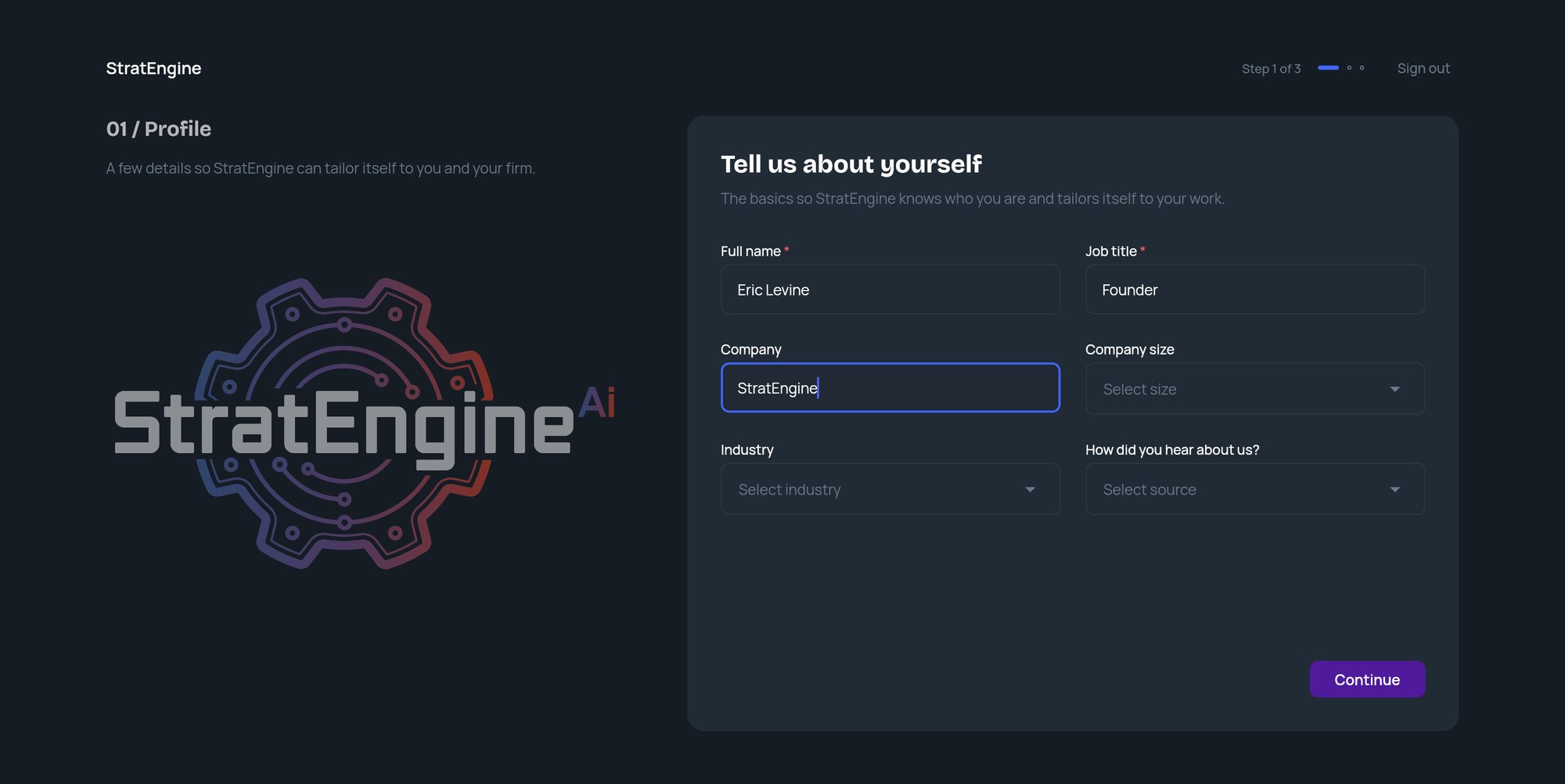
The header shows where you are (for example **Step 2 of 3**) and a **Sign out** link. From the second step on, a **Back** link returns you to the previous step.
 ### Welcome
A fresh account starts on **See how StratEngine works**, a one-minute walkthrough video. Watching is optional. Click **Let's get set up** to start the steps.
If you skip the video, you can watch it later from Home with **Watch the 1-minute walkthrough** (shown until you create your first project).
### Profile
The heading reads **Tell us about yourself**. Fill in:
* **Full name** (required)
* **Job title** (required)
* **Company**
* **Company size**: **1**, **2-10**, **11-50**, **51-200**, **201-1000** or **1000+**
* **Industry**: pick from the list, or choose **Other** and type your industry
* **How did you hear about us?**: pick an option, or choose **Other** and type your answer
Click **Continue**. If a required field is empty, or you chose **Other** and left its text box blank, the field is highlighted and you see **Please fill in the highlighted fields to continue.**
The company and industry you enter here carry into the next step.
### Your company
The heading reads **Save your company once**. Type the **Company name** (it's prefilled from your Profile if you entered one) and click **Continue**. StratEngine creates a [saved company](/docs/strategy/saved-companies) with that name and your industry. Each new analysis can then start from it, so you don't retype the basics.
To skip, click **Skip for now**. Clicking **Continue** with the name left blank also counts as skipping.
You can add more saved companies, and fill in the rest of their details, later from **Saved Companies** in the side menu.
### Private documents
The heading reads **Add private documents**. Add plans, board decks, customer research or anything else that isn't public. StratEngine searches these alongside public sources in every analysis.
Drag files onto **Drop files here, or choose files**, or click it to browse. Accepted: PDF, Word, PowerPoint, Excel, Markdown or text, up to 50 MB each.
Each file shows its progress. While files upload, the button reads **Uploading…** and you can't continue yet. Once the upload finishes, indexing carries on in the background, so you don't need to wait for files to show **Ready**.
Click **Continue**. If you haven't added anything, click **Skip for now** instead.
Private documents are visible to everyone in your workspace. You can add more later, or sync a cloud folder, from **Settings**. See [Private documents](/docs/strategy/private-documents).
## Finishing
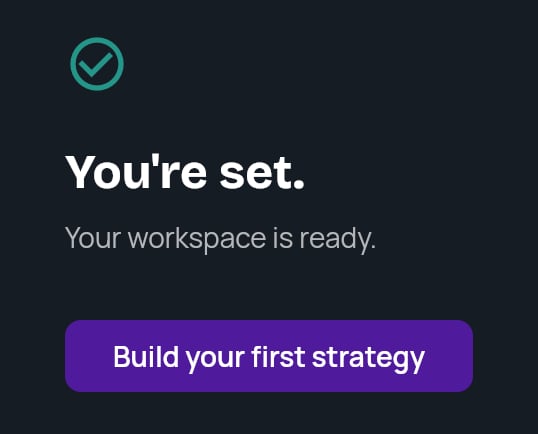
After the last step you see **You're set.** If you saved a company, the card names it. Otherwise it reads **Your workspace is ready.**
Click **Build your first strategy** to go straight to Strategy Builder. The [Quickstart](/docs/strategy/quickstart) picks up from there.
If StratEngine can't save your progress at the end, it asks you to click **Continue** to retry. If that keeps failing, email [help@stratengineai.com](mailto:help@stratengineai.com).
### Welcome
A fresh account starts on **See how StratEngine works**, a one-minute walkthrough video. Watching is optional. Click **Let's get set up** to start the steps.
If you skip the video, you can watch it later from Home with **Watch the 1-minute walkthrough** (shown until you create your first project).
### Profile
The heading reads **Tell us about yourself**. Fill in:
* **Full name** (required)
* **Job title** (required)
* **Company**
* **Company size**: **1**, **2-10**, **11-50**, **51-200**, **201-1000** or **1000+**
* **Industry**: pick from the list, or choose **Other** and type your industry
* **How did you hear about us?**: pick an option, or choose **Other** and type your answer
Click **Continue**. If a required field is empty, or you chose **Other** and left its text box blank, the field is highlighted and you see **Please fill in the highlighted fields to continue.**
The company and industry you enter here carry into the next step.
### Your company
The heading reads **Save your company once**. Type the **Company name** (it's prefilled from your Profile if you entered one) and click **Continue**. StratEngine creates a [saved company](/docs/strategy/saved-companies) with that name and your industry. Each new analysis can then start from it, so you don't retype the basics.
To skip, click **Skip for now**. Clicking **Continue** with the name left blank also counts as skipping.
You can add more saved companies, and fill in the rest of their details, later from **Saved Companies** in the side menu.
### Private documents
The heading reads **Add private documents**. Add plans, board decks, customer research or anything else that isn't public. StratEngine searches these alongside public sources in every analysis.
Drag files onto **Drop files here, or choose files**, or click it to browse. Accepted: PDF, Word, PowerPoint, Excel, Markdown or text, up to 50 MB each.
Each file shows its progress. While files upload, the button reads **Uploading…** and you can't continue yet. Once the upload finishes, indexing carries on in the background, so you don't need to wait for files to show **Ready**.
Click **Continue**. If you haven't added anything, click **Skip for now** instead.
Private documents are visible to everyone in your workspace. You can add more later, or sync a cloud folder, from **Settings**. See [Private documents](/docs/strategy/private-documents).
## Finishing
After the last step you see **You're set.** If you saved a company, the card names it. Otherwise it reads **Your workspace is ready.**
Click **Build your first strategy** to go straight to Strategy Builder. The [Quickstart](/docs/strategy/quickstart) picks up from there.
If StratEngine can't save your progress at the end, it asks you to click **Continue** to retry. If that keeps failing, email [help@stratengineai.com](mailto:help@stratengineai.com).
 ## Leaving and coming back
StratEngine saves your progress each time you finish or skip a step. If you close the tab or click **Sign out**, you return to the step you were on the next time you sign in. Anything you skipped stays recorded as skipped.
If you chose a paid plan on the StratEngine website before signing in, onboarding first shows **Setting up your account...** and then sends you to checkout for your workspace. The steps start after that. See [Upgrade from the StratEngine website](/docs/strategy/billing/plans#upgrade-from-the-stratengine-website).
## Finish skipped steps from Home
Steps you skipped appear as reminder rows on Home. Each row has a link that takes you to the right place, and the row disappears once the task is done anywhere in the app.
| Skipped step | Reminder link | Where it goes | Disappears when |
| - | - | - | - |
| Your company | **Save →** | **Saved Companies** | Your workspace has at least one saved company |
| Private documents | **Add →** | **Settings** | Your workspace has at least one private document |
On a brand-new Home, the reminders sit above **Let's start with your first strategy.** Once you've created something, they move below your recent work.
Clicking **Continue** on the Private documents step without adding files isn't counted as a skip, so no reminder appears. Add documents any time from **Settings**.
## Related
* [Quickstart: your first strategy](/docs/strategy/quickstart)
* [Saved companies](/docs/strategy/saved-companies)
* [Private documents](/docs/strategy/private-documents)
* [Finding your way around](/docs/strategy/navigation)
## Related topics
- [Onboarding](/docs/vc/onboarding.md)
- [Finding your way around](/docs/strategy/navigation.md)
- [Custom scoring frameworks](/docs/vc/scoring-frameworks.md)
- [Auto-ingest decks from a folder or email](/docs/vc/folder-watch.md)
This documentation is built and hosted on [Mintlify](https://mintlify.com), a developer documentation platform.
## Leaving and coming back
StratEngine saves your progress each time you finish or skip a step. If you close the tab or click **Sign out**, you return to the step you were on the next time you sign in. Anything you skipped stays recorded as skipped.
If you chose a paid plan on the StratEngine website before signing in, onboarding first shows **Setting up your account...** and then sends you to checkout for your workspace. The steps start after that. See [Upgrade from the StratEngine website](/docs/strategy/billing/plans#upgrade-from-the-stratengine-website).
## Finish skipped steps from Home
Steps you skipped appear as reminder rows on Home. Each row has a link that takes you to the right place, and the row disappears once the task is done anywhere in the app.
| Skipped step | Reminder link | Where it goes | Disappears when |
| - | - | - | - |
| Your company | **Save →** | **Saved Companies** | Your workspace has at least one saved company |
| Private documents | **Add →** | **Settings** | Your workspace has at least one private document |
On a brand-new Home, the reminders sit above **Let's start with your first strategy.** Once you've created something, they move below your recent work.
Clicking **Continue** on the Private documents step without adding files isn't counted as a skip, so no reminder appears. Add documents any time from **Settings**.
## Related
* [Quickstart: your first strategy](/docs/strategy/quickstart)
* [Saved companies](/docs/strategy/saved-companies)
* [Private documents](/docs/strategy/private-documents)
* [Finding your way around](/docs/strategy/navigation)
## Related topics
- [Onboarding](/docs/vc/onboarding.md)
- [Finding your way around](/docs/strategy/navigation.md)
- [Custom scoring frameworks](/docs/vc/scoring-frameworks.md)
- [Auto-ingest decks from a folder or email](/docs/vc/folder-watch.md)
This documentation is built and hosted on [Mintlify](https://mintlify.com), a developer documentation platform.