> ## Documentation Index
> Fetch the complete documentation index at: https://stratengineai.com/docs/llms.txt
> Use this file to discover all available pages before exploring further.
# Strategy briefs and Edit with AI
> Read a strategy brief, change it by chatting with the AI Editor, and export it, view it in the browser or turn it into a deck.
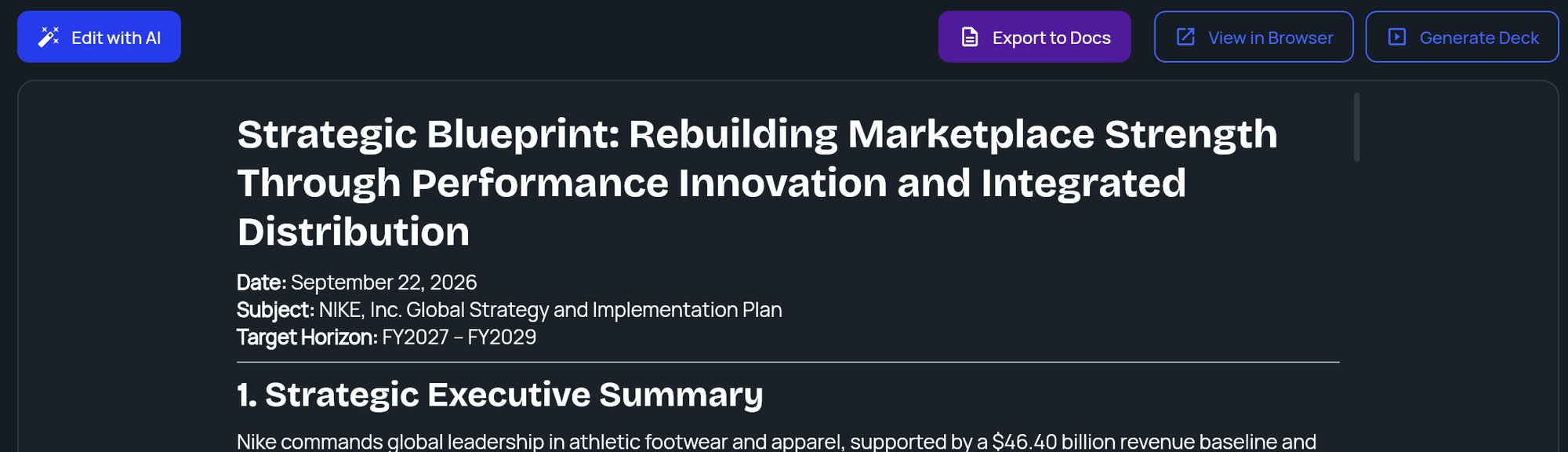
A strategy brief opens in the document viewer: the brief on the left and a toolbar above it. To change the brief, click **Edit with AI** and tell the AI Editor what you want, such as a shorter section, more data or a different tone. The brief updates in place.
To reopen a brief later, find it in [File Manager](/docs/strategy/file-manager). While a brief is open, the side menu also shows **Strategy Report** to take you back to it.
 ## The toolbar
| Button | What it does |
| - | - |
| **Edit with AI** | Opens the AI Editor beside the brief. Hidden while the editor is open. |
| **Export to Docs** | Saves a copy to your export destination and opens it. See [below](#export-to-docs). |
| **View Doc** | Opens the copy you exported. Appears after your first export. |
| **View in Browser** | Opens a formatted version in a new tab, which you can print or save as a PDF. |
| **Generate Deck** | Turns the brief into a presentation. Reads **Regenerate Deck** once a deck exists. |
| **View Deck**, **Share**, **Export** | Open, share or export the deck. Appear once a deck exists. |
If the deck no longer matches the brief, for example after an AI edit, an **Outdated** badge appears next to the deck links. StratEngine never regenerates a deck by itself. See [Outdated decks](/docs/strategy/decks/outdated) and [Generate a deck](/docs/strategy/decks/generate).
## Edit with AI
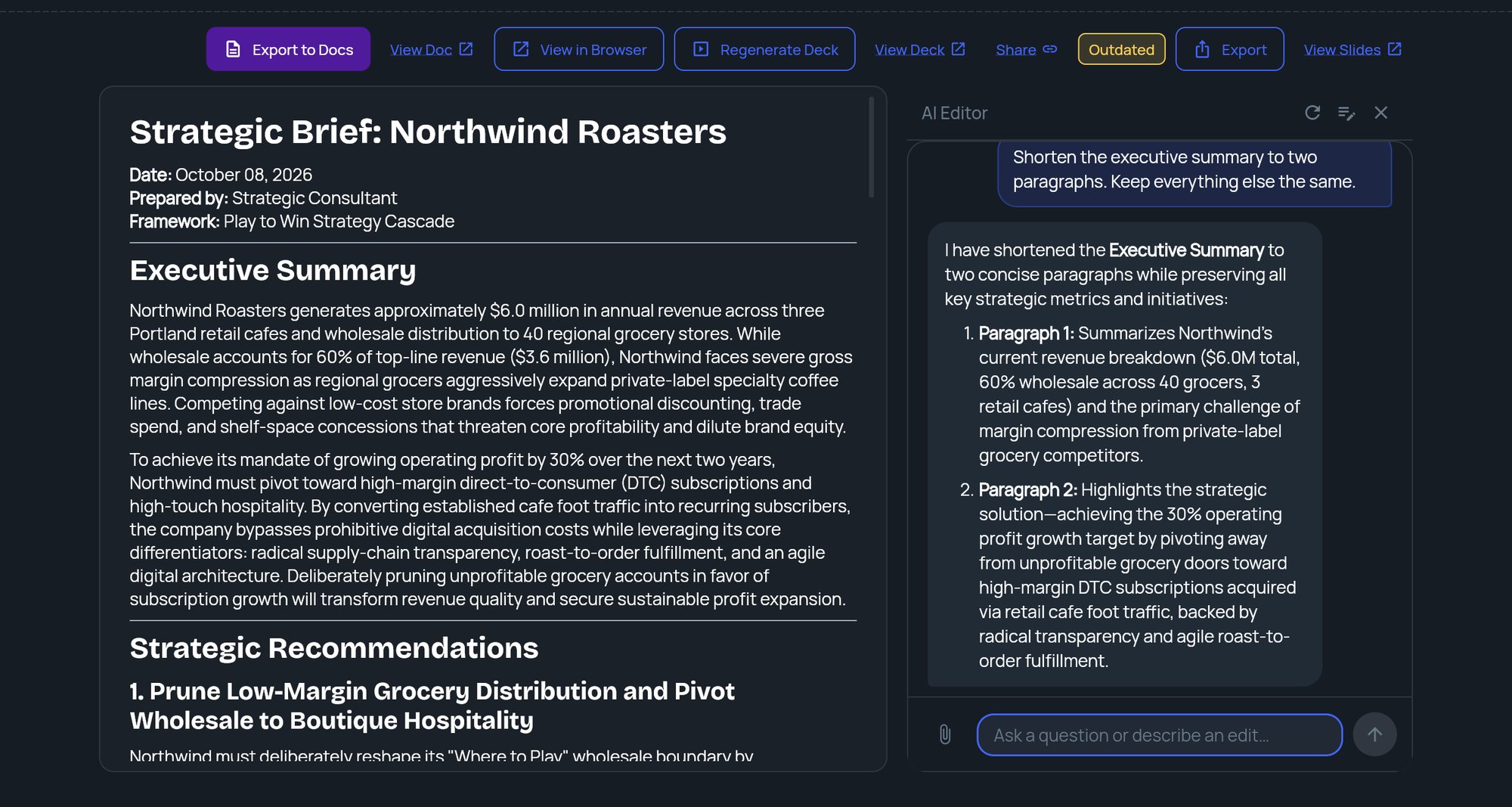
Click **Edit with AI**. The **AI Editor** panel slides in on the right. Its first message suggests what you can ask for: expanding or shortening sections, adding data or examples, changing the tone or style, or giving more context for re-analysis.
Type in the box (**Ask a question or describe an edit…**) and press Enter or click send. Be specific about which section and what you want, for example "Shorten the executive summary to one paragraph" or "Add pricing examples to the recommendations."
For most requests, the editor replies in the chat and the brief on the left updates in place.
## The toolbar
| Button | What it does |
| - | - |
| **Edit with AI** | Opens the AI Editor beside the brief. Hidden while the editor is open. |
| **Export to Docs** | Saves a copy to your export destination and opens it. See [below](#export-to-docs). |
| **View Doc** | Opens the copy you exported. Appears after your first export. |
| **View in Browser** | Opens a formatted version in a new tab, which you can print or save as a PDF. |
| **Generate Deck** | Turns the brief into a presentation. Reads **Regenerate Deck** once a deck exists. |
| **View Deck**, **Share**, **Export** | Open, share or export the deck. Appear once a deck exists. |
If the deck no longer matches the brief, for example after an AI edit, an **Outdated** badge appears next to the deck links. StratEngine never regenerates a deck by itself. See [Outdated decks](/docs/strategy/decks/outdated) and [Generate a deck](/docs/strategy/decks/generate).
## Edit with AI
Click **Edit with AI**. The **AI Editor** panel slides in on the right. Its first message suggests what you can ask for: expanding or shortening sections, adding data or examples, changing the tone or style, or giving more context for re-analysis.
Type in the box (**Ask a question or describe an edit…**) and press Enter or click send. Be specific about which section and what you want, for example "Shorten the executive summary to one paragraph" or "Add pricing examples to the recommendations."
For most requests, the editor replies in the chat and the brief on the left updates in place.
 ### Edits that rerun the analysis
Some requests need more than a rewrite, for example when you give new facts about the company or ask for a different strategic direction. The editor then replies **I've started the analysis...** and a progress indicator shows while StratEngine reruns the analysis. When it finishes, the brief refreshes with the new version. If it fails, an error explains what went wrong.
### Attach files
Click the paperclip to attach files that give the editor more context, such as a market report or meeting notes.
* Up to 5 files per message.
* PDF, Word (DOCX), PowerPoint (PPTX), Excel (XLSX), Markdown or text files.
* Up to 50 MB each, and no more than 300,000 characters of text per file. Files over either limit aren't attached, and the editor tells you why.
### Saved-company notes
If the brief started from a [saved company](/docs/strategy/saved-companies), the editor can remember what you tell it about the company for future analyses. When it does, a small note appears in the chat, such as **Saved to your company context**, **Updated in your company context** or **Removed from your company context**. You can review and edit these notes on the **Saved Companies** screen.
### Editor controls
The icons at the top of the AI Editor:
* **Clear conversation**: starts a fresh conversation. The editor forgets the earlier messages, and they don't come back when you reopen the brief.
* **Edit manually**: opens the framework behind the brief so you can edit its fields directly. See [Work with framework results](/docs/strategy/framework-results).
* **Close**: hides the editor. Your conversation is kept for next time you open it.
## Export to Docs
**Export to Docs** saves the brief to the export destination you've connected:
* **Google Drive:** a Google Doc.
* **Dropbox, Box or OneDrive:** a Word (DOCX) file.
Exports go into a `StratEngine/Strategy Briefs/` folder, inside your export folder if you chose one, and the exported document opens in a new tab. If you haven't connected an export destination yet, StratEngine asks you to connect one first. See [Connect cloud storage](/docs/account/connections) and [Export a document, print, or save as PDF](/docs/strategy/export-documents).
## If there's no brief
If the viewer shows **Click here to create a strategy brief**, nothing has been generated for this project yet. Click it to open Strategy Builder.
## Related
* [Generate a deck](/docs/strategy/decks/generate)
* [Export a document, print, or save as PDF](/docs/strategy/export-documents)
* [Review your brief and run the analysis](/docs/strategy/review-and-run)
* [Saved companies](/docs/strategy/saved-companies)
## Related topics
- [Client proposals](/docs/strategy/proposals.md)
- [Work with framework results](/docs/strategy/framework-results.md)
- [Saved companies](/docs/strategy/saved-companies.md)
- [Outdated decks](/docs/strategy/decks/outdated.md)
- [Research reports](/docs/strategy/research.md)
This documentation is built and hosted on [Mintlify](https://mintlify.com), a developer documentation platform.
### Edits that rerun the analysis
Some requests need more than a rewrite, for example when you give new facts about the company or ask for a different strategic direction. The editor then replies **I've started the analysis...** and a progress indicator shows while StratEngine reruns the analysis. When it finishes, the brief refreshes with the new version. If it fails, an error explains what went wrong.
### Attach files
Click the paperclip to attach files that give the editor more context, such as a market report or meeting notes.
* Up to 5 files per message.
* PDF, Word (DOCX), PowerPoint (PPTX), Excel (XLSX), Markdown or text files.
* Up to 50 MB each, and no more than 300,000 characters of text per file. Files over either limit aren't attached, and the editor tells you why.
### Saved-company notes
If the brief started from a [saved company](/docs/strategy/saved-companies), the editor can remember what you tell it about the company for future analyses. When it does, a small note appears in the chat, such as **Saved to your company context**, **Updated in your company context** or **Removed from your company context**. You can review and edit these notes on the **Saved Companies** screen.
### Editor controls
The icons at the top of the AI Editor:
* **Clear conversation**: starts a fresh conversation. The editor forgets the earlier messages, and they don't come back when you reopen the brief.
* **Edit manually**: opens the framework behind the brief so you can edit its fields directly. See [Work with framework results](/docs/strategy/framework-results).
* **Close**: hides the editor. Your conversation is kept for next time you open it.
## Export to Docs
**Export to Docs** saves the brief to the export destination you've connected:
* **Google Drive:** a Google Doc.
* **Dropbox, Box or OneDrive:** a Word (DOCX) file.
Exports go into a `StratEngine/Strategy Briefs/` folder, inside your export folder if you chose one, and the exported document opens in a new tab. If you haven't connected an export destination yet, StratEngine asks you to connect one first. See [Connect cloud storage](/docs/account/connections) and [Export a document, print, or save as PDF](/docs/strategy/export-documents).
## If there's no brief
If the viewer shows **Click here to create a strategy brief**, nothing has been generated for this project yet. Click it to open Strategy Builder.
## Related
* [Generate a deck](/docs/strategy/decks/generate)
* [Export a document, print, or save as PDF](/docs/strategy/export-documents)
* [Review your brief and run the analysis](/docs/strategy/review-and-run)
* [Saved companies](/docs/strategy/saved-companies)
## Related topics
- [Client proposals](/docs/strategy/proposals.md)
- [Work with framework results](/docs/strategy/framework-results.md)
- [Saved companies](/docs/strategy/saved-companies.md)
- [Outdated decks](/docs/strategy/decks/outdated.md)
- [Research reports](/docs/strategy/research.md)
This documentation is built and hosted on [Mintlify](https://mintlify.com), a developer documentation platform.