> ## Documentation Index
> Fetch the complete documentation index at: https://stratengineai.com/docs/llms.txt
> Use this file to discover all available pages before exploring further.
# Analysis Memos
> Triage every memo in your workspace: filter by status, sort by date, company or conviction score, read the AI summary, and open the memo or research report.
**Analysis Memos** (the page is headed **Memo Manager**) lists every memo in your workspace. Filter it with the status tabs, sort it by **Conviction (High-Low)** to rank your pipeline, and click a tile to read its summary, change its status, or open the memo and research report.
Everyone in your workspace can open any memo and sees status changes. Only the person who uploaded a deck can export its memo.
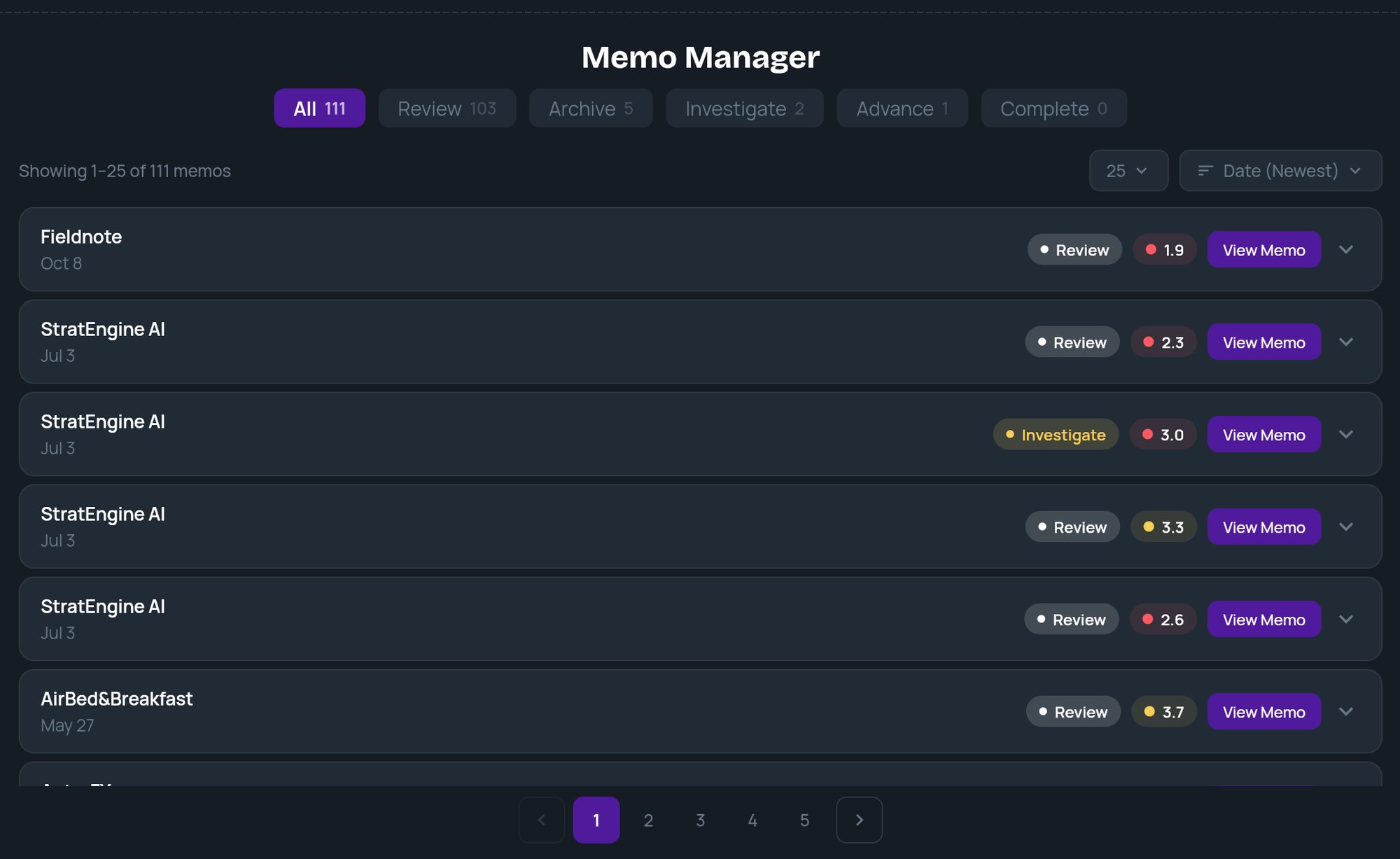 ## Status tabs
The tabs across the top filter the list. Each shows a count.
| Tab | Typical use |
| - | - |
| **All** | Every memo. |
| **Review** | New memos. Every memo starts here. |
| **Archive** | Passed or parked deals. The tile's pill reads **Archived**. |
| **Investigate** | Deals that need more diligence. |
| **Advance** | Deals moving forward. |
| **Complete** | Deals you're done with. The tile's pill and chip read **Completed**. |
The statuses are labels for your own workflow. Changing one doesn't move, export or delete anything.
## Sort and page
A line above the list shows which memos you are viewing out of the current tab's total.
* **Sort:** **Date (Newest)** (default), **Date (Oldest)**, **Company (A-Z)**, **Company (Z-A)**, **Conviction (High-Low)**, **Conviction (Low-High)**.
* **Page size:** 25, 50, 75 or 100 per page. Page numbers appear below the list when there's more than one page.
## Read a tile
A collapsed tile shows the company name, the date, a status pill, the conviction score and **View Memo**.
The conviction score is the deal's weighted score against your scoring framework, shown to one decimal place. Its dot is green at 4.0 and above, amber from 3.0 to 3.9, and red below 3.0. See [Custom scoring frameworks](/docs/vc/scoring-frameworks).
Click anywhere else on the tile to expand it:
* **AI Summary:** a short summary of the memo.
* **Status chips:** **Review**, **Archive**, **Investigate**, **Advance**, **Completed**. Click one to change the status. If the change doesn't save, the chip switches back and you'll see **Couldn't update the memo status. Please try again.**
* **View Analysis Memo** and **View Research Report:** open either document. See [Read an investment memo](/docs/vc/read-memo).
A memo that has been exported opens from its file in your storage, in a new tab, instead of inside StratEngine. See [Export memos](/docs/vc/export-memos).
## Empty list
With no memos at all, the page shows **No Memos Generated** and a **Generate Memos** button that opens **Upload**. An empty tab names its status, for example **No Review memos**.
If the list can't load, an error appears with a **Retry** button.
## Related
* [Read an investment memo](/docs/vc/read-memo)
* [Upload pitch decks](/docs/vc/upload)
* [Export memos](/docs/vc/export-memos)
* [Custom scoring frameworks](/docs/vc/scoring-frameworks)
## Related topics
- [Export memos](/docs/vc/export-memos.md)
- [Read an investment memo](/docs/vc/read-memo.md)
- [Quickstart: your first memo](/docs/vc/quickstart.md)
- [Finding your way around](/docs/vc/navigation.md)
- [Introduction](/docs/vc/index.md)
This documentation is built and hosted on [Mintlify](https://mintlify.com), a developer documentation platform.
## Status tabs
The tabs across the top filter the list. Each shows a count.
| Tab | Typical use |
| - | - |
| **All** | Every memo. |
| **Review** | New memos. Every memo starts here. |
| **Archive** | Passed or parked deals. The tile's pill reads **Archived**. |
| **Investigate** | Deals that need more diligence. |
| **Advance** | Deals moving forward. |
| **Complete** | Deals you're done with. The tile's pill and chip read **Completed**. |
The statuses are labels for your own workflow. Changing one doesn't move, export or delete anything.
## Sort and page
A line above the list shows which memos you are viewing out of the current tab's total.
* **Sort:** **Date (Newest)** (default), **Date (Oldest)**, **Company (A-Z)**, **Company (Z-A)**, **Conviction (High-Low)**, **Conviction (Low-High)**.
* **Page size:** 25, 50, 75 or 100 per page. Page numbers appear below the list when there's more than one page.
## Read a tile
A collapsed tile shows the company name, the date, a status pill, the conviction score and **View Memo**.
The conviction score is the deal's weighted score against your scoring framework, shown to one decimal place. Its dot is green at 4.0 and above, amber from 3.0 to 3.9, and red below 3.0. See [Custom scoring frameworks](/docs/vc/scoring-frameworks).
Click anywhere else on the tile to expand it:
* **AI Summary:** a short summary of the memo.
* **Status chips:** **Review**, **Archive**, **Investigate**, **Advance**, **Completed**. Click one to change the status. If the change doesn't save, the chip switches back and you'll see **Couldn't update the memo status. Please try again.**
* **View Analysis Memo** and **View Research Report:** open either document. See [Read an investment memo](/docs/vc/read-memo).
A memo that has been exported opens from its file in your storage, in a new tab, instead of inside StratEngine. See [Export memos](/docs/vc/export-memos).
## Empty list
With no memos at all, the page shows **No Memos Generated** and a **Generate Memos** button that opens **Upload**. An empty tab names its status, for example **No Review memos**.
If the list can't load, an error appears with a **Retry** button.
## Related
* [Read an investment memo](/docs/vc/read-memo)
* [Upload pitch decks](/docs/vc/upload)
* [Export memos](/docs/vc/export-memos)
* [Custom scoring frameworks](/docs/vc/scoring-frameworks)
## Related topics
- [Export memos](/docs/vc/export-memos.md)
- [Read an investment memo](/docs/vc/read-memo.md)
- [Quickstart: your first memo](/docs/vc/quickstart.md)
- [Finding your way around](/docs/vc/navigation.md)
- [Introduction](/docs/vc/index.md)
This documentation is built and hosted on [Mintlify](https://mintlify.com), a developer documentation platform.