> ## Documentation Index
> Fetch the complete documentation index at: https://stratengineai.com/docs/llms.txt
> Use this file to discover all available pages before exploring further.
# Private documents
> Upload thesis documents, past memos and IC notes in Settings so StratEngine searches them alongside public sources when it analyzes a deck.
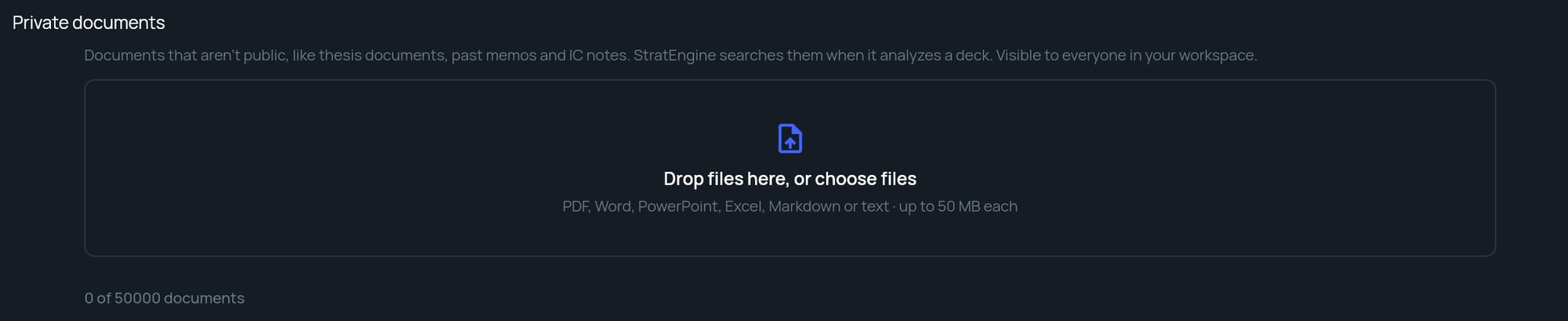
Private documents are files your firm holds that aren't public: your investment thesis, past memos, IC notes, founder diligence. Upload them in **Settings** under **Private documents**, and StratEngine searches them alongside public research whenever it analyzes a pitch deck. Each upload is indexed first, then marked **Ready**.
Private documents are visible to everyone in your workspace, and StratEngine searches them for every deck anyone in the workspace analyzes. Upload a document only if your whole workspace should be able to see it.
## Upload documents
Click **Settings** in the side menu and find **Private documents**.
Drag files onto **Drop files here, or choose files**, or click it to pick files.
Each file shows **Uploading…**, then **Indexing…**, then **Ready**. You can leave the page while files index. Decks analyzed after a file is **Ready** can draw on it.
 You can also add private documents in the **Private documents** step of [onboarding](/docs/vc/onboarding).
## What to upload
Documents that help StratEngine judge a deal the way your firm would:
* Your investment thesis and sector notes
* Past investment memos
* IC notes and decision records
* Founder and market diligence
## Supported files and limits
| Limit | Value |
| - | - |
| File types | PDF, Word (`.docx`), PowerPoint (`.pptx`), Excel (`.xlsx`), Markdown (`.md`) and text (`.txt`) |
| File size | Up to 50 MB each |
| Files per upload | Up to 20 at once. If you add more, StratEngine uploads the first 20 and asks you to add the rest in another batch. |
| Daily uploads | Your workspace has a daily upload limit. If you reach it, you'll see **Daily upload limit reached. Try again tomorrow.** |
| Total documents | Set by your plan. The counter under the list shows usage, for example **12 of 500 documents**. |
Uploaded files and files from a [synced cloud folder](/docs/account/folder-sync) count toward the same total. If you upload a file that's already there, StratEngine skips it and tells you, for example **1 file was already uploaded.**
## Document statuses
| Status | Meaning |
| - | - |
| **Uploading…** | The file is being sent to StratEngine. |
| **Indexing…** | StratEngine is reading the file so analyses can search it. |
| **Ready** | Analyses can use the file. |
| A red message, such as **We couldn't read this file.** | Indexing failed. Click **Retry** if it's offered, or upload a different version of the file. |
## Remove a document
Click the **×** at the end of the document's row. The document and everything StratEngine indexed from it are removed, and later analyses no longer use it. Memos already generated aren't changed.
You can remove documents you uploaded; workspace admins can remove any uploaded document. A file can't be removed while it's indexing.
## Private documents, folder watch and synced folders
These three are easy to mix up:
| Feature | What it does |
| - | - |
| Private documents | Files StratEngine searches for context when analyzing decks. Nothing is scored. |
| [Synced cloud folder](/docs/account/folder-sync) | Keeps a cloud folder's files in your private documents, automatically. Admins set it up. |
| [Folder watch](/docs/vc/folder-watch) | Treats each new file in a folder as a pitch deck and writes a memo for it. |
Don't put pitch decks you want analyzed in private documents; upload them on the **Upload** page instead.
## Related
* [Upload pitch decks](/docs/vc/upload)
* [Sync a cloud folder](/docs/account/folder-sync)
* [Onboarding](/docs/vc/onboarding)
* [FAQ: who can see what](/docs/account/faq#who-in-my-workspace-can-see-what)
## Related topics
- [Private documents](/docs/strategy/private-documents.md)
- [Onboarding](/docs/vc/onboarding.md)
- [Sync a cloud folder](/docs/account/folder-sync.md)
- [Workspaces](/docs/account/workspaces.md)
This documentation is built and hosted on [Mintlify](https://mintlify.com), a developer documentation platform.
You can also add private documents in the **Private documents** step of [onboarding](/docs/vc/onboarding).
## What to upload
Documents that help StratEngine judge a deal the way your firm would:
* Your investment thesis and sector notes
* Past investment memos
* IC notes and decision records
* Founder and market diligence
## Supported files and limits
| Limit | Value |
| - | - |
| File types | PDF, Word (`.docx`), PowerPoint (`.pptx`), Excel (`.xlsx`), Markdown (`.md`) and text (`.txt`) |
| File size | Up to 50 MB each |
| Files per upload | Up to 20 at once. If you add more, StratEngine uploads the first 20 and asks you to add the rest in another batch. |
| Daily uploads | Your workspace has a daily upload limit. If you reach it, you'll see **Daily upload limit reached. Try again tomorrow.** |
| Total documents | Set by your plan. The counter under the list shows usage, for example **12 of 500 documents**. |
Uploaded files and files from a [synced cloud folder](/docs/account/folder-sync) count toward the same total. If you upload a file that's already there, StratEngine skips it and tells you, for example **1 file was already uploaded.**
## Document statuses
| Status | Meaning |
| - | - |
| **Uploading…** | The file is being sent to StratEngine. |
| **Indexing…** | StratEngine is reading the file so analyses can search it. |
| **Ready** | Analyses can use the file. |
| A red message, such as **We couldn't read this file.** | Indexing failed. Click **Retry** if it's offered, or upload a different version of the file. |
## Remove a document
Click the **×** at the end of the document's row. The document and everything StratEngine indexed from it are removed, and later analyses no longer use it. Memos already generated aren't changed.
You can remove documents you uploaded; workspace admins can remove any uploaded document. A file can't be removed while it's indexing.
## Private documents, folder watch and synced folders
These three are easy to mix up:
| Feature | What it does |
| - | - |
| Private documents | Files StratEngine searches for context when analyzing decks. Nothing is scored. |
| [Synced cloud folder](/docs/account/folder-sync) | Keeps a cloud folder's files in your private documents, automatically. Admins set it up. |
| [Folder watch](/docs/vc/folder-watch) | Treats each new file in a folder as a pitch deck and writes a memo for it. |
Don't put pitch decks you want analyzed in private documents; upload them on the **Upload** page instead.
## Related
* [Upload pitch decks](/docs/vc/upload)
* [Sync a cloud folder](/docs/account/folder-sync)
* [Onboarding](/docs/vc/onboarding)
* [FAQ: who can see what](/docs/account/faq#who-in-my-workspace-can-see-what)
## Related topics
- [Private documents](/docs/strategy/private-documents.md)
- [Onboarding](/docs/vc/onboarding.md)
- [Sync a cloud folder](/docs/account/folder-sync.md)
- [Workspaces](/docs/account/workspaces.md)
This documentation is built and hosted on [Mintlify](https://mintlify.com), a developer documentation platform.