> ## Documentation Index
> Fetch the complete documentation index at: https://stratengineai.com/docs/llms.txt
> Use this file to discover all available pages before exploring further.
# Read an investment memo
> Open a memo or its research report, navigate with the Contents rail, open it in a new tab to print or copy, and know what changes after export.
Each analyzed deck produces two documents: the **investment memo**, which is the analysis of the deal, and the **research report**, the supporting research on the company. Open either one from its tile in **Analysis Memos**. It opens inside StratEngine with a **Contents** rail, and **Open in New Tab** gives you a standalone copy to print or copy.
## Open a memo
| From | Click | Opens |
| - | - | - |
| A collapsed tile in **Analysis Memos** | **View Memo** | The memo |
| An expanded tile | **View Analysis Memo** or **View Research Report** | The memo or the research report |
| A **Done** tile in the **Processing Queue** | **View** | The memo |
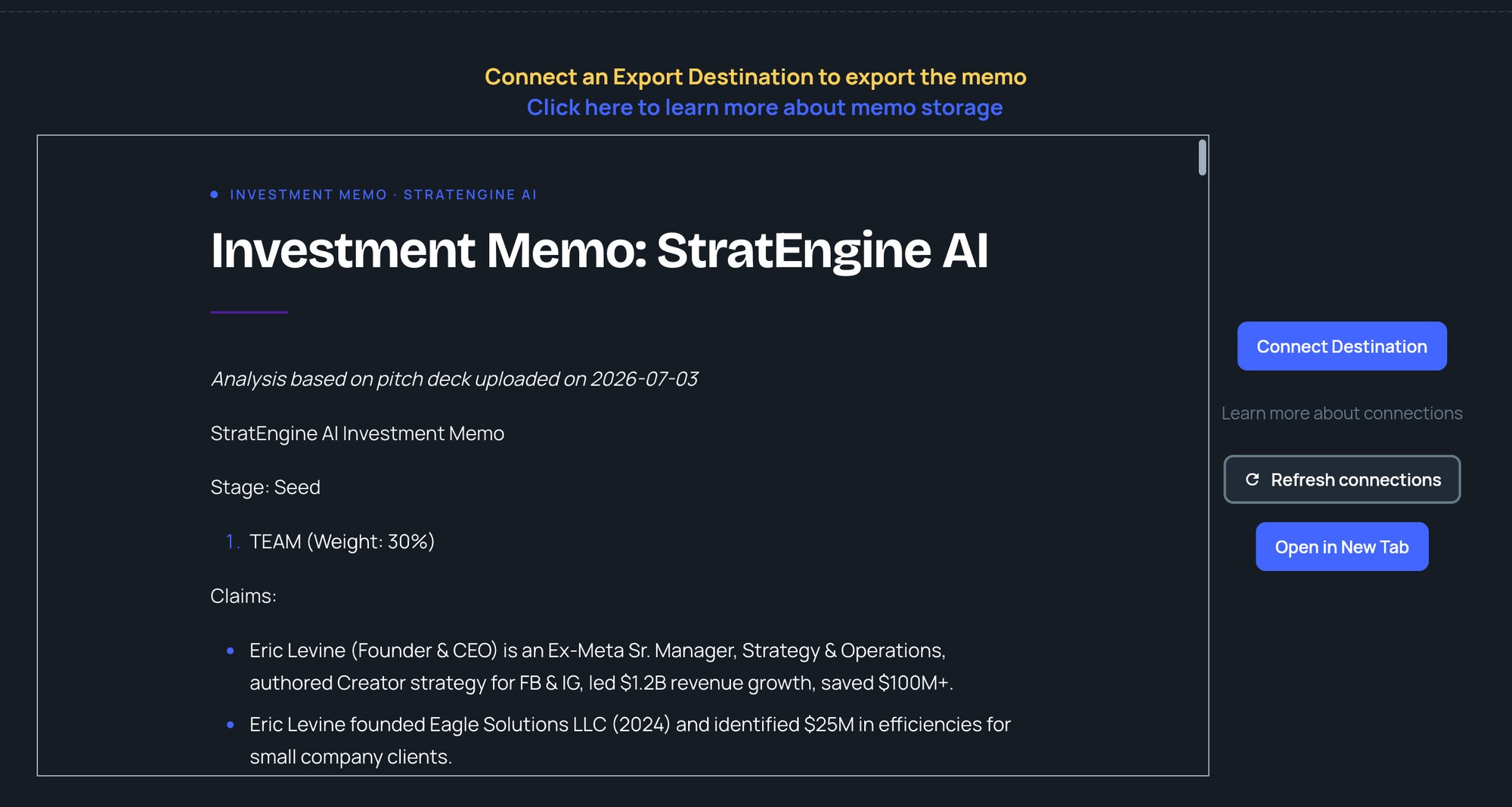
The page is headed **View Memo** or **View Research Report**, and the document is labeled **INVESTMENT MEMO** or **RESEARCH REPORT** above its title.
 ## Inside the document
* **Contents:** a rail of the document's headings. Click one to jump to it; the rail highlights where you are as you scroll.
* **Text:** select and copy text as in any web page, and use your browser's find to search it.
* **Links:** sources and other links open in a new tab, so you don't lose your place.
## Open in a new tab
Click **Open in New Tab** for a standalone copy of the document. Its toolbar has:
| Button | What it does |
| - | - |
| **Print** | Opens your browser's print dialog. Choose "Save as PDF" there for a PDF. |
| **Copy** | Copies the whole document with formatting, ready to paste into a doc or email. You'll see **Copied to clipboard**. |
| **×** | Closes the tab. |
If nothing opens, your browser blocked the new tab. See [Troubleshooting](/docs/account/troubleshooting#a-new-tab-or-window-doesnt-open).
## Buttons beside the memo
What you see next to the document depends on your plan and whether you have an export destination:
| Situation | Buttons |
| - | - |
| Free plan | **Upgrade to Export**, which opens the billing portal, and **Open in New Tab** |
| Paid plan, no export destination | **Connect Destination**, **Refresh connections** and **Open in New Tab** |
| Paid plan with an export destination | **Export to Destination** and **Open in New Tab** |
Without an export destination, a **Connect an Export Destination to export the memo** banner also appears above the document, on any plan.
See [Export memos](/docs/vc/export-memos) before you click **Export to Destination**: it removes the memo's contents from StratEngine.
## Exported memos
Once a memo has been exported, or was saved straight to storage when it was created, **View Memo** and the tile buttons open the file in your storage in a new tab instead of the in-app view. For memos exported to Google Drive, the in-app view can still load the document.
If you see **Error loading memo, please try again**, click the message to go back to **Analysis Memos**, then open the memo from its tile.
## Related
* [Analysis Memos](/docs/vc/memo-manager)
* [Export memos](/docs/vc/export-memos)
* [Custom scoring frameworks](/docs/vc/scoring-frameworks)
* [Troubleshooting](/docs/account/troubleshooting)
## Related topics
- [Analysis Memos](/docs/vc/memo-manager.md)
- [Export memos](/docs/vc/export-memos.md)
- [Quickstart: your first memo](/docs/vc/quickstart.md)
- [Upload pitch decks](/docs/vc/upload.md)
- [StratEngine documentation](/docs/index.md)
This documentation is built and hosted on [Mintlify](https://mintlify.com), a developer documentation platform.
## Inside the document
* **Contents:** a rail of the document's headings. Click one to jump to it; the rail highlights where you are as you scroll.
* **Text:** select and copy text as in any web page, and use your browser's find to search it.
* **Links:** sources and other links open in a new tab, so you don't lose your place.
## Open in a new tab
Click **Open in New Tab** for a standalone copy of the document. Its toolbar has:
| Button | What it does |
| - | - |
| **Print** | Opens your browser's print dialog. Choose "Save as PDF" there for a PDF. |
| **Copy** | Copies the whole document with formatting, ready to paste into a doc or email. You'll see **Copied to clipboard**. |
| **×** | Closes the tab. |
If nothing opens, your browser blocked the new tab. See [Troubleshooting](/docs/account/troubleshooting#a-new-tab-or-window-doesnt-open).
## Buttons beside the memo
What you see next to the document depends on your plan and whether you have an export destination:
| Situation | Buttons |
| - | - |
| Free plan | **Upgrade to Export**, which opens the billing portal, and **Open in New Tab** |
| Paid plan, no export destination | **Connect Destination**, **Refresh connections** and **Open in New Tab** |
| Paid plan with an export destination | **Export to Destination** and **Open in New Tab** |
Without an export destination, a **Connect an Export Destination to export the memo** banner also appears above the document, on any plan.
See [Export memos](/docs/vc/export-memos) before you click **Export to Destination**: it removes the memo's contents from StratEngine.
## Exported memos
Once a memo has been exported, or was saved straight to storage when it was created, **View Memo** and the tile buttons open the file in your storage in a new tab instead of the in-app view. For memos exported to Google Drive, the in-app view can still load the document.
If you see **Error loading memo, please try again**, click the message to go back to **Analysis Memos**, then open the memo from its tile.
## Related
* [Analysis Memos](/docs/vc/memo-manager)
* [Export memos](/docs/vc/export-memos)
* [Custom scoring frameworks](/docs/vc/scoring-frameworks)
* [Troubleshooting](/docs/account/troubleshooting)
## Related topics
- [Analysis Memos](/docs/vc/memo-manager.md)
- [Export memos](/docs/vc/export-memos.md)
- [Quickstart: your first memo](/docs/vc/quickstart.md)
- [Upload pitch decks](/docs/vc/upload.md)
- [StratEngine documentation](/docs/index.md)
This documentation is built and hosted on [Mintlify](https://mintlify.com), a developer documentation platform.