> ## Documentation Index
> Fetch the complete documentation index at: https://stratengineai.com/docs/llms.txt
> Use this file to discover all available pages before exploring further.
# Custom scoring frameworks
> Build a scoring framework with 3 to 9 categories, 1-to-5 scoring anchors and per-stage weights, and set the workspace default every deck is scored against.
A scoring framework decides how StratEngine scores a deal: which categories it rates, what a 5 and a 1 look like in each, and how much each category weighs at each funding stage. Every deck is scored against your workspace's default framework. Use the built-in **StratEngine AI** framework, or create your own under **Settings** > **Pitch Deck Scoring Frameworks**.
Frameworks are shared across your workspace, and the default applies to every deck anyone uploads, forwards or drops in a watched folder. A deck is scored against the default as it stands when the deck arrives; changing a framework later doesn't rescore existing memos.
## How scoring works
Each category gets a score from 1 to 5, judged against that category's scoring anchors. StratEngine works out the deck's funding stage, then combines the category scores using that stage's weights into the conviction score shown on the memo tile. If the deck's stage is outside the stages your framework covers, the nearest covered stage's weights are used.
## Manage frameworks
**Settings** > **Pitch Deck Scoring Frameworks** lists every framework in the workspace, with the default first and marked **DEFAULT**. Each row shows its category count and when it was last updated.
| Action | How |
| - | - |
| Create a framework | Click **+ Create**. You can also use the **Framework** tile on Home. |
| View one | Click its row. It opens read-only; click **Edit framework** to change it. |
| Edit | Click the edit icon (**Edit**). |
| Make it the default | Click the **Set as default** icon, or turn on **Set as default framework** in the editor. |
| Delete | Click the delete icon, then **Tap to confirm**. |
The built-in **StratEngine AI** framework can be viewed and set as default, but not edited or deleted. It's the default whenever no custom framework is. Opening it shows **Create new**, which starts a new framework.
## Create a framework
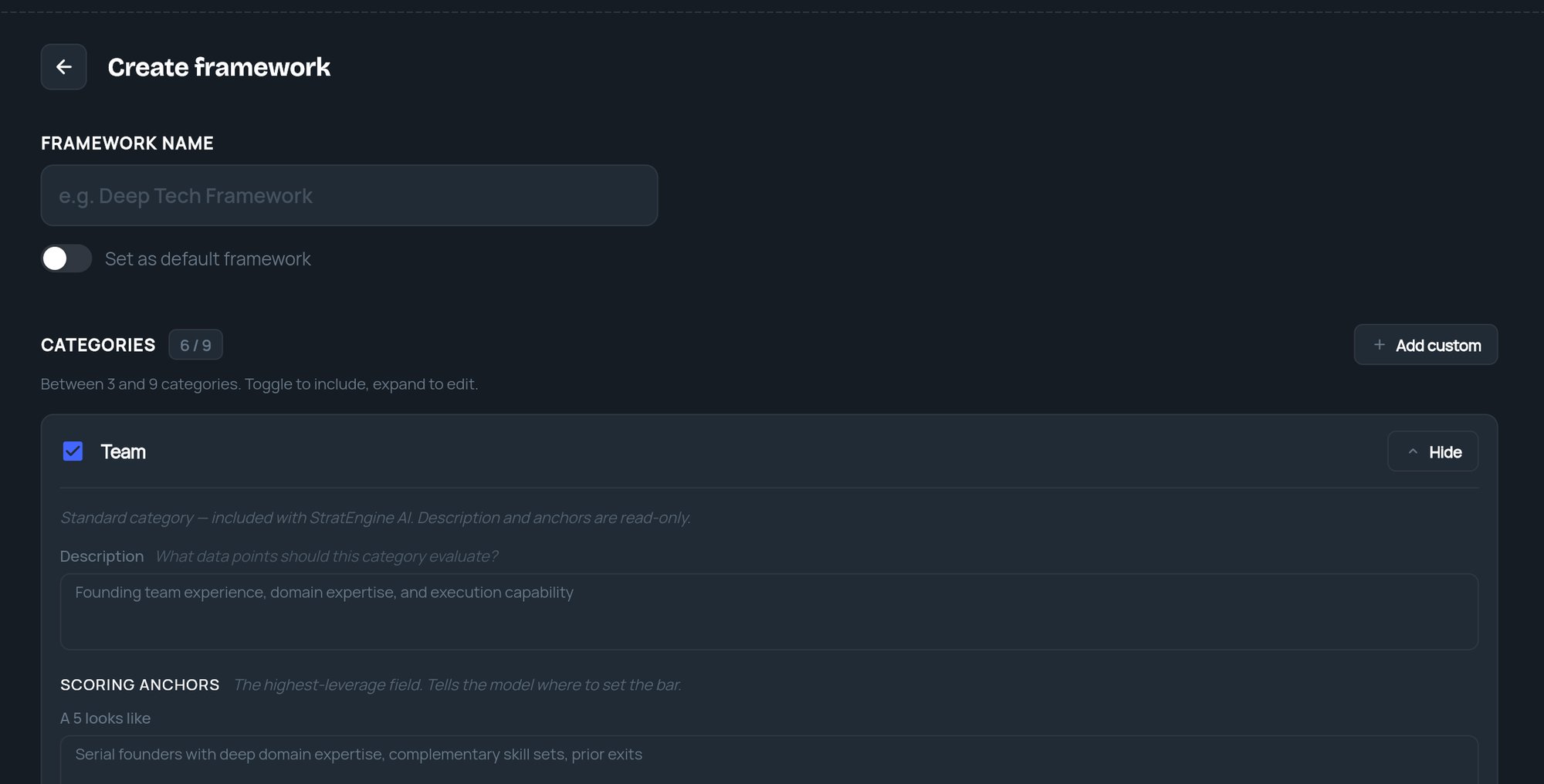
Under **Framework name**, enter up to 50 characters, for example "Deep Tech Framework". Turn on **Set as default framework** if new decks should use it.
Under **Categories**, a new framework starts with six standard categories switched on: Team, Product, Market, Traction, Business Model and Risk. Further preset categories are listed switched off. Use each category's toggle to include or exclude it; the counter shows how many are active, such as **6 / 9**.
Standard categories come with fixed descriptions and anchors. Click **Details** to read them.
Click **Add custom**. Fill in **Name**, **Description** (what the category should evaluate, up to 500 characters) and the two **SCORING ANCHORS**: **A 5 looks like** and **A 1 looks like**. To remove a custom category, click **Remove category**.
The anchors matter most: they tell StratEngine where to set the bar.
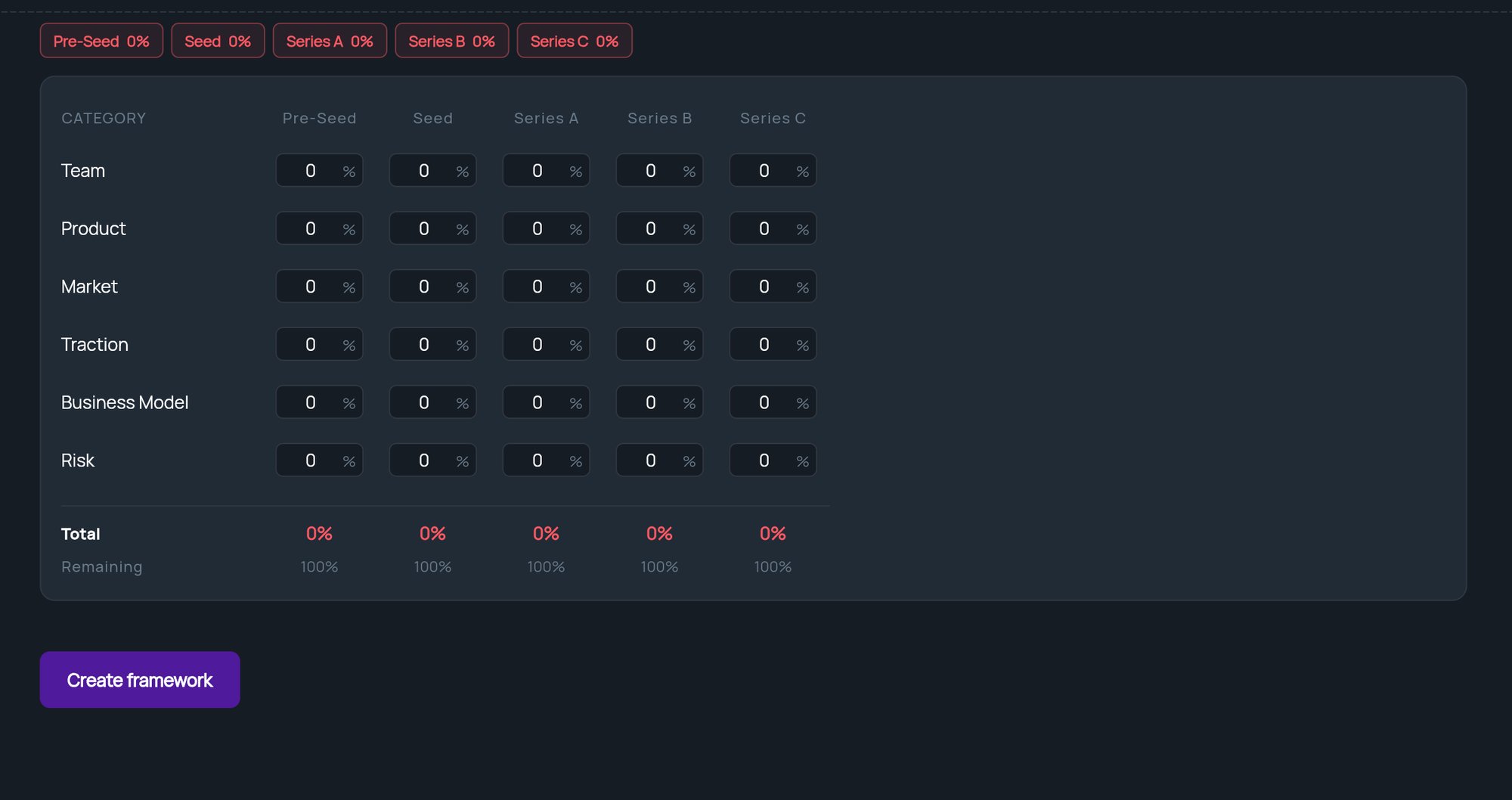
Under **Weights**, the table has a column per funding stage, starting at Pre-Seed to Series C. Use the **Add** and **Remove** buttons at either end to cover earlier or later stages, from Pre-Seed up to Series Z. The stages must be continuous.
Enter a percentage for each category in each stage. Each stage's **Total** must be 100%; **Remaining** shows what's left to assign. **Distribute evenly** splits 100% equally across the active categories in every stage.
Click **Create framework** (or **Save changes** when editing).
 ## Why a save is refused
An error appears above the form. Common ones:
| Message | Fix |
| - | - |
| **Framework name is required** | Enter a name. |
| **At least 3 categories are required** or **Maximum 9 categories allowed** | Adjust the toggles. |
| A stage's weights "sum to N%, must be 100%" | Fix that stage's column, or click **Distribute evenly**. |
| A category "needs a description" | Custom categories need a description. |
| A category "needs a distinct name" | Two categories have names too similar to tell apart. Rename one. |
| **A framework with this name already exists** | Choose another name. |
## Related
* [Analysis Memos](/docs/vc/memo-manager)
* [Onboarding](/docs/vc/onboarding)
* [Upload pitch decks](/docs/vc/upload)
* [Private documents](/docs/vc/private-documents)
## Related topics
- [Onboarding](/docs/vc/onboarding.md)
- [Read an investment memo](/docs/vc/read-memo.md)
- [Analysis Memos](/docs/vc/memo-manager.md)
- [Quickstart: your first memo](/docs/vc/quickstart.md)
- [Upload pitch decks](/docs/vc/upload.md)
This documentation is built and hosted on [Mintlify](https://mintlify.com), a developer documentation platform.
## Why a save is refused
An error appears above the form. Common ones:
| Message | Fix |
| - | - |
| **Framework name is required** | Enter a name. |
| **At least 3 categories are required** or **Maximum 9 categories allowed** | Adjust the toggles. |
| A stage's weights "sum to N%, must be 100%" | Fix that stage's column, or click **Distribute evenly**. |
| A category "needs a description" | Custom categories need a description. |
| A category "needs a distinct name" | Two categories have names too similar to tell apart. Rename one. |
| **A framework with this name already exists** | Choose another name. |
## Related
* [Analysis Memos](/docs/vc/memo-manager)
* [Onboarding](/docs/vc/onboarding)
* [Upload pitch decks](/docs/vc/upload)
* [Private documents](/docs/vc/private-documents)
## Related topics
- [Onboarding](/docs/vc/onboarding.md)
- [Read an investment memo](/docs/vc/read-memo.md)
- [Analysis Memos](/docs/vc/memo-manager.md)
- [Quickstart: your first memo](/docs/vc/quickstart.md)
- [Upload pitch decks](/docs/vc/upload.md)
This documentation is built and hosted on [Mintlify](https://mintlify.com), a developer documentation platform.