> ## Documentation Index
> Fetch the complete documentation index at: https://stratengineai.com/docs/llms.txt
> Use this file to discover all available pages before exploring further.
# Upload pitch decks
> Upload PDF or PPTX pitch decks, follow each one through the Processing Queue, open the finished memo, and handle failed uploads.
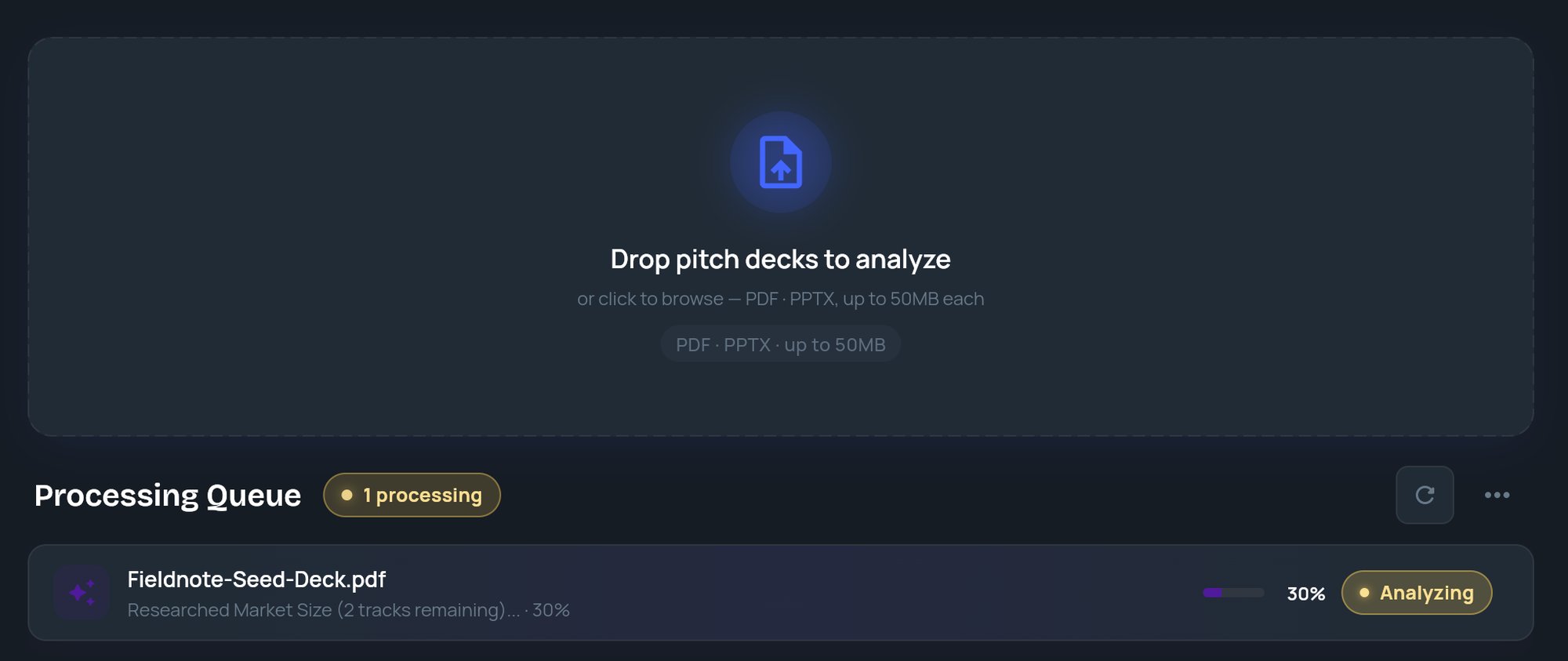
Drop PDF or PPTX pitch decks (up to 50MB each) on the **Upload** page. Each deck appears in the **Processing Queue** and moves from **Queued** to **Analyzing** to **Done**, then **View** opens its memo. Analysis runs on StratEngine's servers, so you can leave the page while it works.
On the Free plan, uploads stop once your monthly memo allowance is used: dropping a deck opens the plan picker for admins, and members see **Ask your admin to upgrade.** On paid plans, decks past the allowance are analyzed and billed as overages. See [VC plans and memo overages](/docs/vc/billing/plans) and [pricing](https://stratengineai.com/investor#pricing).
## Upload decks
Click **Upload** in the side menu, or **Pitch deck** on Home.
Drag files onto **Drop pitch decks to analyze**, or click it to pick files. You can add several at once. The box shows **Uploading...** while files are sent.
Each deck gets a tile in **Processing Queue** with its status, the current analysis step and a percentage.
When a tile shows **Done**, its title changes to the company name. Click **View** to open the memo.
 Every deck is scored against your workspace's default scoring framework, as it stands when you upload. See [Custom scoring frameworks](/docs/vc/scoring-frameworks).
## File rules
| Rule | Detail |
| - | - |
| File types | PDF and PPTX. Other files are rejected with **Unsupported format**. |
| Size | Up to 50MB per file. Larger files are rejected with **File too large**. |
| Several at once | Allowed. If more than one file is rejected, a message says how many, and **Details** lists each reason. |
## Processing Queue
| Status | Subtitle on the tile | Action |
| - | - | - |
| **Queued** | Queued for analysis | None |
| **Analyzing** | The current step and a percentage | None |
| **Done** | The file name and "ready to review" | **View** |
| **Failed** | The error message | **Info** and **Retry** |
The header shows counts such as **2 processing**, **1 queued**, **3 done** and **1 error**.
| Control | What it does |
| - | - |
| Refresh icon (**Refresh queue**) | Re-checks the status of every deck. |
| **Clear finished** | Removes **Done** tiles from the queue. The memos stay in **Analysis Memos**. |
| **More** menu, **Hide all (including in-progress)** | Hides every tile after you confirm **Hide all**. Analyses keep running, and finished memos are still saved. |
Clearing or hiding tiles only changes this view. It never deletes a memo or cancels an analysis.
## When a deck fails
Click **Info** to see the error, then click **Retry** to run the deck again.
Decks still in progress come back to the queue when you return to **Upload** or reload the page. Finished and failed decks don't: find finished ones in [Analysis Memos](/docs/vc/memo-manager).
Decks forwarded by email also appear in the queue while the **Upload** page is open. See [Auto-ingest decks from a folder or email](/docs/vc/folder-watch).
## Related
* [Analysis Memos](/docs/vc/memo-manager)
* [Read an investment memo](/docs/vc/read-memo)
* [Auto-ingest decks from a folder or email](/docs/vc/folder-watch)
* [VC plans and memo overages](/docs/vc/billing/plans)
## Related topics
- [Auto-ingest decks from a folder or email](/docs/vc/folder-watch.md)
- [Quickstart: your first memo](/docs/vc/quickstart.md)
- [Private documents](/docs/vc/private-documents.md)
- [Finding your way around](/docs/vc/navigation.md)
- [StratEngine documentation](/docs/index.md)
This documentation is built and hosted on [Mintlify](https://mintlify.com), a developer documentation platform.
Every deck is scored against your workspace's default scoring framework, as it stands when you upload. See [Custom scoring frameworks](/docs/vc/scoring-frameworks).
## File rules
| Rule | Detail |
| - | - |
| File types | PDF and PPTX. Other files are rejected with **Unsupported format**. |
| Size | Up to 50MB per file. Larger files are rejected with **File too large**. |
| Several at once | Allowed. If more than one file is rejected, a message says how many, and **Details** lists each reason. |
## Processing Queue
| Status | Subtitle on the tile | Action |
| - | - | - |
| **Queued** | Queued for analysis | None |
| **Analyzing** | The current step and a percentage | None |
| **Done** | The file name and "ready to review" | **View** |
| **Failed** | The error message | **Info** and **Retry** |
The header shows counts such as **2 processing**, **1 queued**, **3 done** and **1 error**.
| Control | What it does |
| - | - |
| Refresh icon (**Refresh queue**) | Re-checks the status of every deck. |
| **Clear finished** | Removes **Done** tiles from the queue. The memos stay in **Analysis Memos**. |
| **More** menu, **Hide all (including in-progress)** | Hides every tile after you confirm **Hide all**. Analyses keep running, and finished memos are still saved. |
Clearing or hiding tiles only changes this view. It never deletes a memo or cancels an analysis.
## When a deck fails
Click **Info** to see the error, then click **Retry** to run the deck again.
Decks still in progress come back to the queue when you return to **Upload** or reload the page. Finished and failed decks don't: find finished ones in [Analysis Memos](/docs/vc/memo-manager).
Decks forwarded by email also appear in the queue while the **Upload** page is open. See [Auto-ingest decks from a folder or email](/docs/vc/folder-watch).
## Related
* [Analysis Memos](/docs/vc/memo-manager)
* [Read an investment memo](/docs/vc/read-memo)
* [Auto-ingest decks from a folder or email](/docs/vc/folder-watch)
* [VC plans and memo overages](/docs/vc/billing/plans)
## Related topics
- [Auto-ingest decks from a folder or email](/docs/vc/folder-watch.md)
- [Quickstart: your first memo](/docs/vc/quickstart.md)
- [Private documents](/docs/vc/private-documents.md)
- [Finding your way around](/docs/vc/navigation.md)
- [StratEngine documentation](/docs/index.md)
This documentation is built and hosted on [Mintlify](https://mintlify.com), a developer documentation platform.