Ultimate Guide to AI Usability for Executives
Make AI actionable for executives with usable dashboards, governance, onboarding, and metrics that drive measurable ROI.
Apr 15, 2026
Ultimate Guide to AI Usability for Executives
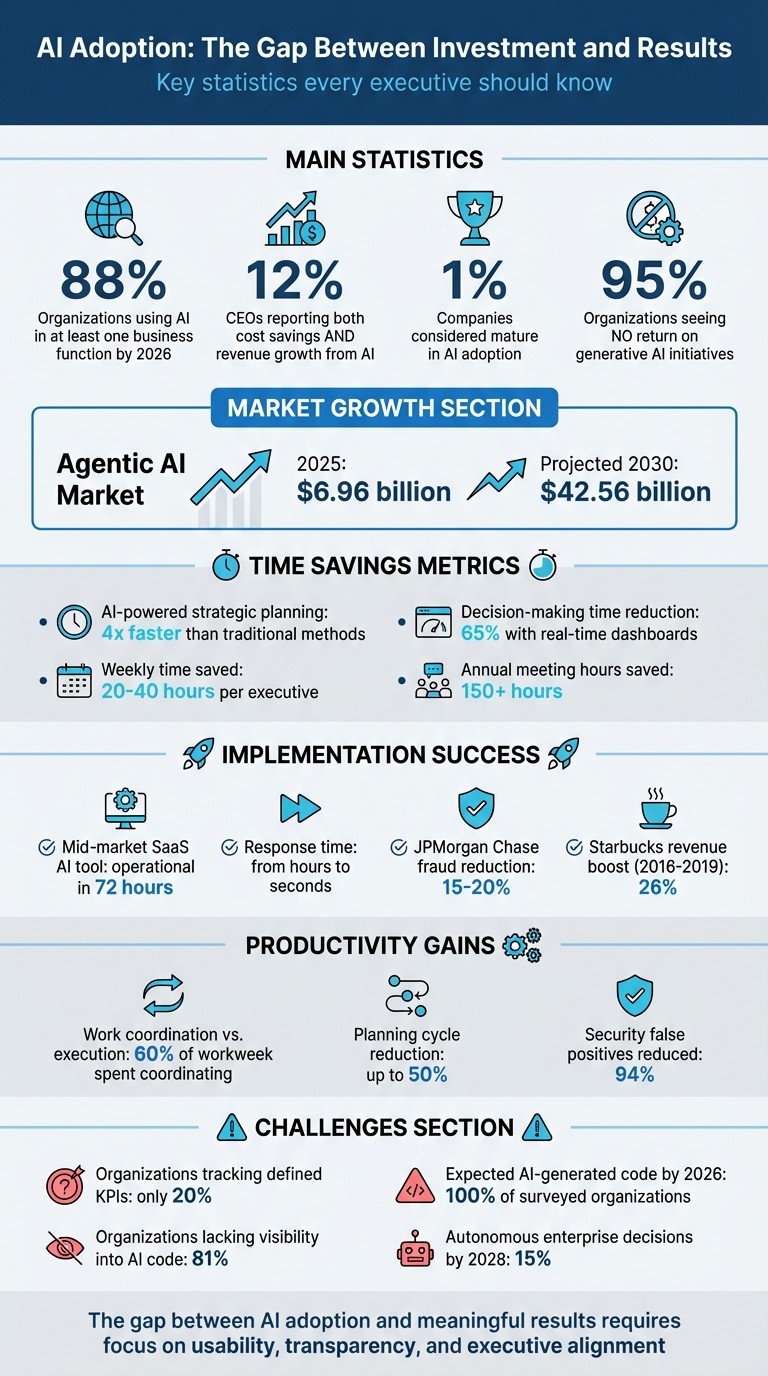
AI is transforming decision-making, but usability challenges hold many companies back. By 2026, 88% of organizations will use AI in at least one business function, yet only 12% of CEOs report seeing both cost savings and revenue growth from it. The problem? Disconnected tools, unclear outputs, and a lack of alignment with executive workflows.
This guide focuses on practical ways to close the gap between AI adoption and meaningful results. Here’s what you’ll learn:
How AI tools can simplify decision-making with clear insights and seamless integration.
The importance of transparency, such as showing confidence levels and data sources for trust.
Key challenges like leadership alignment, fragmented data, and resistance to change.
Steps to onboard executives by linking AI to business goals and teaching fundamentals.
Methods to improve AI usability, including customized dashboards, structured frameworks, and automation.
The takeaway: AI should work the way executives think, enabling faster, smarter decisions without adding complexity. Companies that prioritize usability will gain a competitive edge while others struggle to adapt.
AI Adoption Statistics and ROI Metrics for Executive Decision-Making
How to Use AI for Strategic Leadership (Not Just Tasks) with Geoff Woods
sbb-itb-7250072
What AI Usability Means for Executives
For executives, making AI usable isn't about diving into the complexities of algorithms or neural networks. Instead, it's about getting clear, actionable insights quickly to support critical decision-making. The ideal AI tool seamlessly integrates into your workflow - no steep learning curves, no jumping between platforms, and no confusing outputs.
The agentic AI market, valued at $6.96 billion in 2025, is expected to grow to $42.56 billion by 2030 [5]. But the true measure of success isn't market size - it's whether these tools enable faster, smarter decisions. As Nexstrat.ai explains, "AI is not just a support tool but a strategic asset that augments human judgment with unprecedented speed and precision" [3]. To achieve this, AI must adapt to executive workflows, not the other way around.
For AI to be genuinely useful, it must show its work. This means providing step-by-step reasoning for every recommendation and referencing the data sources behind it [5]. This "actionable transparency" builds trust, allowing executives to evaluate the AI's logic much like they would an analyst's report. The result? Confidence to make the final call. Up next, we'll examine the specific features executives need and the challenges they face when integrating AI into their decision-making processes.
Usability Requirements for Executive Decision-Making
Executives need AI solutions that check three critical boxes: simplifying complexity, integrating seamlessly, and providing clarity.
Simplifying complexity: Time is scarce. AI tools should have simple, intuitive interfaces, enabling leaders to run scenario analyses or update forecasts without needing a background in data science. Breaking down strategic goals into smaller, manageable subtasks is key [5].
Seamless integration: AI should work within existing systems. Standalone dashboards that require manual data transfers between platforms like CRM, ERP, or financial planning systems waste time and create inefficiencies [4].
Clarity through trust calibration: Effective AI tools display confidence levels for their recommendations [5]. For example, if an AI flags limited data in a market entry analysis, it signals the need for further review. This transparency allows executives to decide how much autonomy the AI should have - whether it acts independently or waits for approval.
In November 2025, a mid-market SaaS company implemented an AI support tool that became operational in just 72 hours. The result? It now handles most Tier-1 support tickets autonomously, cutting first-response times from hours to seconds [4]. This kind of measurable impact - delivering results within 90 days - illustrates the potential of well-designed AI tools to transform operations.
However, while usability is crucial, several challenges continue to slow AI adoption at the executive level.
Why Executives Struggle to Adopt AI
The biggest hurdle isn't the technology itself - it’s leadership alignment and AI fluency [1]. Only 1% of companies are considered mature in AI adoption, and executives often act as the bottleneck [1]. Many leaders struggle to automate strategic briefs, weigh risks, or interpret AI performance metrics [4]. Without these skills, it's hard to separate genuine value from vendor hype.
Another issue is tool fragmentation. When data from market intelligence, financial forecasts, and customer insights is scattered across different systems, the AI can't generate reliable recommendations. This fragmented environment leads to inconsistent results, eroding trust in AI outputs [2].
Then there's the human factor. Some executives and teams fear that AI might replace their roles, creating resistance during implementation [4]. Successful rollouts address these concerns head-on, presenting AI as a way to reduce workloads - freeing up time for strategic tasks that require human expertise, like building relationships or making nuanced decisions.
The shift from "project-based AI" to treating AI as a core utility demands a fundamental mindset change. Here's how the two approaches compare:
Feature | Project-Based AI | AI as Core Utility |
|---|---|---|
Scope | Single-function deployment | Enterprise-wide integration |
Measurement | Local ROI | Impact on margin, growth, and risk |
Management | Technical teams | Executive oversight |
Updates | Episodic | Continuous lifecycle management |
Moving toward the "AI as Core Utility" model means embedding AI into critical systems, managing it with executive oversight, and measuring its success through enterprise-level metrics [2]. Overcoming these challenges is essential for harnessing AI’s full potential and ensuring it delivers real, lasting value - not just another tool that sits unused.
How to Onboard Executives to AI Tools
Bringing executives on board with AI tools starts by tying AI initiatives directly to business goals and fostering a practical understanding of AI's potential. Moving from isolated experiments to full-scale integration across the enterprise requires a well-thought-out plan. This plan should balance short-term successes with the groundwork for sustainable, long-term impact, ensuring AI efforts align with strategic business objectives.
Connecting AI Adoption to Business Goals
AI initiatives should never be treated as just another IT project. Instead, they should be framed around measurable business outcomes. Start by identifying 3–5 key metrics that executives already monitor - such as days sales outstanding, time-to-hire, or forecast accuracy - and link AI use cases directly to these goals.
"If a use case doesn't move a business metric, it's a candidate to drop." - Ameya Deshmukh, Everworker [4]
To ensure success, consider adopting a 70-20-10 strategy:
70% for quick wins that demonstrate immediate value,
20% for platform enablers that build necessary infrastructure,
10% for transformative, long-term projects.
Pair this with a 30-60-90 day roadmap, which outlines clear metrics, tests production-ready solutions, and scales successful initiatives under executive guidance [4]. An AI Profit & Loss statement can also help track the benefits realized compared to forecasts, providing finance teams with concrete evidence of AI's impact.
Once AI efforts are aligned with business goals, executives need to develop a working knowledge of AI to effectively guide these initiatives.
Teaching Executives AI Fundamentals
Executives don’t need to dive into the technical depths of neural networks. Instead, they need a practical understanding of AI - how to frame use cases, evaluate risks, and interpret results [4]. This shift involves moving from instinct-driven decisions to a data-informed approach, while still valuing human judgment to interpret context and nuance [3].
To simplify adoption, organizations can establish standardized model defaults - pre-approved models and prompt templates that allow teams to act quickly without requiring repeated security reviews. A distributed governance model can further streamline processes by combining centralized policies with localized risk management, reducing delays [4].
The goal is to train executives to oversee AI as a core business utility rather than a series of isolated projects. This mindset shift ensures that AI tools are integrated into critical systems and deliver tangible results, avoiding the pitfall of unused licenses and unrealized potential [2].
Methods to Improve AI Tool Usability
Refining AI tools for executives requires aligning them with how decisions are made at the top level. The goal is to simplify complexity and provide insights that executives can act on immediately. This involves tailoring dashboards, leveraging structured frameworks, and automating repetitive tasks to free up time for strategic thinking.
Customizing Dashboards for Executive Needs
A well-designed executive dashboard offers a bird's-eye view of key performance indicators (KPIs) across all departments - finance, operations, marketing, and HR. But it doesn't stop there. It should also allow for instant deep dives into specific data points, enabling root-cause analysis. Transitioning from static, retrospective reports to real-time intelligence can cut decision-making time by as much as 65% [6].
Modern dashboards should include:
Drill-down capabilities: Let executives explore data layers to uncover the "why" behind trends.
Forecast tools: Use machine learning to predict outcomes.
Transparency features: Display confidence levels and reasoning steps for AI-generated insights.
Conversational interfaces: Enable executives to ask questions in plain English - like "Why did Q3 profits drop?" - and receive immediate, narrative-driven answers without needing a data scientist [6][1].
Another game-changing feature is scenario simulation, which allows leaders to test strategies - such as adjusting pricing or reallocating ad budgets - and view potential outcomes in real time [6].
Before designing dashboards, it's essential to audit the company's data landscape. Identify where data resides, who manages it, and how frequently it's updated to eliminate silos. Then, focus on the 10 most impactful KPIs - like revenue growth or customer churn - and build the dashboard around these metrics [6].
Once dashboards are tailored for executive use, structured frameworks can help translate this data into actionable strategies.
Using Frameworks for Data Analysis
Structured frameworks, such as SWOT analysis or Porter's Five Forces, are invaluable for turning raw data into insights executives can readily interpret [3]. With over 20 strategic models available, these frameworks provide a familiar lens through which decision-makers can view AI-generated analysis.
AI-driven strategic planning often follows a 4-step process:
Assessment: Formulate hypotheses.
Data Collection and Analysis: Use iterative methods to refine insights.
Collaboration: Integrate input across departments.
Strategy Development: Model scenarios and evaluate options [3].
To measure the success of these frameworks, it's crucial to map AI initiatives to an AI profit-and-loss (P&L). This tracks the financial impact - like revenue growth or cost savings - against forecasts. Focus on 3–5 outcome metrics the C-suite already monitors, such as forecast accuracy or days sales outstanding, to ensure alignment with business goals [4].
Platforms like StratEngineAI streamline this process, using established frameworks to generate strategy briefs and investment memos. What once took weeks can now be completed in minutes, maintaining the rigor executives expect.
With frameworks in place, automating routine tasks can further optimize executive workflows.
Automating Repetitive Tasks
Automation is a game-changer for reducing the time executives spend on manual tasks like data collection, report creation, and KPI tracking. By automating these processes, executives can reclaim 20–40 hours each week, allowing them to focus on high-level decision-making [1][5].
Agentic AI systems take automation a step further. These specialized agents - focused on research, analysis, or execution - operate autonomously, mimicking the work of an entire strategy team. They even include self-correcting workflows, where AI evaluates and refines its outputs before presenting them [5].
Key automation techniques include:
Task decomposition: Break down complex goals into smaller, manageable subtasks that AI can execute systematically [5].
System integration: Link AI agents to tools like CRMs and ERPs for real-time dashboard updates and instant anomaly detection [1].
By 2028, it's estimated that 15% of enterprise decisions will be made autonomously by AI [1][3]. However, this shift starts with automating the repetitive tasks that currently consume executive bandwidth.
Feature | Traditional Strategic Planning | AI-Powered Strategic Planning |
|---|---|---|
Data Source | Manual aggregation (Siloed) | Automated live feeds (Integrated) [1] |
Decision Basis | Intuition and historical reports | Real-time data and scenario modeling [3] |
Efficiency | 150+ hours annually in meetings | 20–40 hours saved per week [1] |
Advanced Customization for Executive AI Tools
Advanced customization turns standard AI tools into powerful assets for executive decision-making. After automating routine tasks and personalizing dashboards, the next step involves integrating AI deeply into your company's infrastructure. This includes feeding tools with company-specific data, ensuring cross-department collaboration, and creating secure, scalable systems.
Adding Company Data for Tailored Insights
Generic AI outputs often fall short when it comes to executive-level decisions. The key difference between a practical recommendation and a vague suggestion lies in grounding the AI with validated and well-governed internal datasets [7]. By incorporating unique company data - like customer behavior, financial records, or operational metrics - AI evolves from a general tool to a strategic partner.
A semantic layer helps AI understand your business-specific terminology. For instance, a term like "churn" could mean different things in a SaaS company compared to a retail chain. This layer ensures the AI interprets your KPIs correctly [7][9].
Retrieval-Augmented Generation (RAG) is another game-changer. It ensures AI responses are based on your approved internal data - such as sales reports, market research, or customer feedback - rather than pulling from the internet. This minimizes irrelevant or inaccurate outputs [7][9].
AI can also connect previously siloed data sources - like ad performance, loyalty programs, and financial systems - to uncover growth opportunities traditional tools might miss [3][8]. For example, Starbucks used internal data and location intelligence between 2016 and 2019 to optimize store placements, boosting total revenue by 26% [8].
Accurate data is essential, and robust data governance ensures this. Automating processes like data cleaning and table joining helps maintain the reliability of the information feeding your AI. This foundation enables smoother collaboration across departments.
Building Cross-Department Collaboration
Once your data is tailored, AI can act as a single source of truth across teams. Integrating systems like CRMs, ERPs, and communication platforms into a unified AI layer ensures that finance, operations, marketing, and HR all share real-time insights [10][12].
AI simplifies complex data, turning it into actionable recommendations that bridge the gap between technical and non-technical stakeholders. This is especially helpful in C-suite presentations, where clarity and speed are critical [10].
Automated functional handoffs ensure that context flows seamlessly between departments during transitions, reducing the need for manual follow-ups. Studies show that nearly 60% of the workweek is spent coordinating tasks rather than doing them - AI can significantly cut this time [12].
"The future of collaboration isn't more communication. It's smarter coordination." - Coworker.ai [12]
AI also supports cross-functional "what-if" modeling, allowing teams like marketing or operations to instantly see the financial impact of their decisions. This keeps everyone aligned without requiring extra meetings. Companies using connected AI tools have reported cutting planning cycles by up to 50% [11].
In 2023, JPMorgan Chase implemented AI-powered fraud detection by bringing together risk analysts, data scientists, and compliance experts. This collaboration reduced fraudulent activity by 15-20% [10].
A federated governance model strikes a balance between speed and safety. While a central team sets AI policies, individual business units manage risks specific to their needs. This approach prevents bottlenecks while maintaining oversight [4].
Scaling AI with Secure Systems
As AI tools expand across the organization, security becomes a top priority. Executives must trust that sensitive data - like financial forecasts or strategic plans - is well-protected.
A defense-in-depth strategy is essential. This includes fine-grained access controls, encryption (at rest, in use, and in transit), and data masking to protect sensitive information while still allowing functional use [13]. Automated security guardrails enforce strict access policies and prevent unauthorized data movement [13][14].
An emerging concept is AI-native governance, which includes tools like an AI Bill of Materials (AIBOM). This tracks AI usage across development lifecycles, while real-time secret interception prevents accidental exposure of sensitive credentials [14]. By 2026, 100% of surveyed organizations are expected to have AI-generated code in their systems, yet 81% lack visibility into its usage [14].
"Security in the cloud is a collaborative, mutually beneficial effort that requires you to work closely with your cloud provider." - Nic Smith, Head of Product Marketing, Data & Analytics, Google Cloud [13]
Continuous monitoring and drift detection are vital for maintaining trust. These tools provide real-time visibility into data systems, flagging vulnerabilities and ensuring model accuracy as market conditions evolve [13][2]. AI-powered platforms can reduce false positive security alerts by 94% through automated vulnerability management [14].
Consolidating data into a unified platform with built-in security features ensures data can be safely embedded into executive decision-making. This approach helps scale AI from isolated projects to an enterprise-wide resource.
Security Measure | Function for Executive AI Tools |
|---|---|
AIBOM (AI Bill of Materials) | Tracks AI usage and enforces workflows for authorization [14]. |
Context Intelligence Graph | Maps relationships between code, infrastructure, and identities to identify attack paths [14]. |
Data Masking | Creates functional versions of sensitive data for testing or demos [13]. |
Drift Detection | Monitors model performance to maintain accuracy over time [2]. |
Governance Policy Management | Ensures compliance with data quality and security standards [13]. |
Platforms like StratEngineAI incorporate these principles, offering traceable outputs and reliable analysis tailored for executive needs. By combining secure systems with company-specific data, these tools provide the precision and trustworthiness that leaders require.
Measuring and Improving AI Usability
When it comes to AI tools, success hinges on more than just deploying cutting-edge technology. According to research from MIT Media Lab, 95% of organizations see no return on their generative AI initiatives [15]. The issue isn’t the technology itself - it’s how companies define and measure success. To truly understand AI’s effectiveness, organizations must establish clear, outcome-driven metrics.
Metrics for Assessing AI Usability
Tracking the wrong metrics can derail an AI initiative. For example, measuring how many people log in or submit prompts doesn’t reveal whether the tool is delivering value. As Phil Gilbert, a former IBM executive, explains:
"We've slipped back into the old 'butts-in-seats' metric. We're telling individuals to go use the new tools, and counting how many people do it. Nobody is asking: how is AI helping the team generate better outcomes?" [15]
Instead, businesses should focus on four key metric categories:
Business Impact: Metrics like ROI and revenue growth show whether AI is driving tangible results.
Model Performance: Accuracy and hallucination rates help gauge how well the AI functions.
Operational Metrics: Factors such as latency and token costs measure efficiency.
Risk and Governance: Metrics like bias detection and compliance adherence ensure responsible AI use [18].
Pair leading indicators (like alerts for data drift) with lagging indicators (such as quarterly revenue) to balance foresight with accountability [18]. For example, tracking minutes per decision or experimentation rates can reveal whether AI tools are speeding up strategic choices or just adding noise [15]. Establishing a baseline for current performance before AI deployment is also crucial - it provides a clear counterfactual to measure actual impact [19].
A common pitfall is confusing output with outcome. Output metrics measure activity, while outcome metrics reflect business impact. Shamim Mohammad, CITO at CarMax, points out:
"They're really laser-focused on measuring the wrong things. There's a fundamental misunderstanding of how to measure AI" [17].
Here’s a breakdown of useful metrics:
Metric Category | Key Executive KPI | Why It Matters |
|---|---|---|
Adoption | User Engagement Depth Score | Differentiates between superficial use and true integration into workflows [16]. |
Productivity | Productivity Delta by Role | Shows performance gains for AI users compared to non-users [16]. |
Financial | ROI by Business Unit | Helps identify which AI initiatives to scale or phase out [16]. |
Risk | Compliance Adherence Score | Ensures AI aligns with regulatory standards [16]. |
Once you’ve identified the right metrics, the next step is turning insights into meaningful improvements.
Improving Tools Through Feedback
Metrics alone won’t improve AI tools - actionable feedback is key. Build continuous feedback loops that embed performance data into daily workflows, rather than relying on occasional surveys [4].
For high-stakes decisions, human oversight is critical. Incorporate checkpoints where executives can validate, adjust, or override AI recommendations [4][5]. To measure the effectiveness of this oversight, track metrics like override rates, time-to-trust, and recovery speed [5].
A great example of this approach is Microsoft Copilot’s transparency feature introduced in 2025. It allows users to monitor intermediate steps in workflows, making it easier to intervene or refine AI actions without disrupting the entire process [5]. Features like "undo" and "rollback" empower users to reverse AI actions when necessary, offering greater control [5].
Another innovative idea is a "memory panel" interface. This would let users review, edit, or delete what the AI remembers. Vimal Dwarampudi, author of Beyond AI Agents, highlights the importance of this:
"Memory is a dynamic layer of self-awareness... The UX layer must translate this into accessible control for users, letting them see, verify, and manage what the agent retains" [5].
Before scaling an AI tool from pilot to full production, set clear criteria for performance, accuracy, latency, and security. Use these benchmarks to decide whether to refine, integrate, or abandon the pilot [4]. Segment usage data by department and role to pinpoint where AI is delivering real value and where resistance persists [16]. Alarmingly, only 20% of enterprises currently track defined KPIs for their generative AI efforts [19]. Don’t let your organization fall into that category.
Conclusion
The integration of tailored dashboards, frameworks, and secure systems is reshaping how executives leverage AI in their strategies. This isn't just about keeping up with new technology - it's about changing the way strategic decisions are made. The move from rigid annual planning to a dynamic, "always-on" approach allows leaders to adjust to market shifts in real-time, rather than being tied to quarterly or annual reviews.
"The real transformation begins at the leadership level, where a shift from gut instinct to data-driven intelligence is essential for long-term success."
NexStrat AI [3]
AI-powered tools make strategic planning four times faster than traditional manual methods, saving businesses between 20 and 40 hours every week [1]. Despite this, only 1% of companies have reached a "mature" stage in their AI adoption. Often, the main hurdle isn't the technology itself - it’s the leadership's willingness to embrace it [1].
To succeed, AI needs to evolve from being just a data tool to becoming a strategic collaborator. This means generating hypotheses, evaluating options, and clearly explaining its reasoning throughout the process. Executives who focus on confidence scoring, set clear 90-day ROI targets, and establish federated governance models are more likely to see measurable results. The aim isn't to replace human decision-making but to enhance it - allowing leaders to focus on vision, ethics, and the broader strategic picture.
FAQs
What makes AI “usable” for executives?
AI becomes genuinely helpful for executives when it fits effortlessly into their decision-making processes, simplifying the way they analyze and act on intricate data. The key here is that it should be intuitive and dependable, delivering insights that are easy to act on - no technical background required. This means quicker, smarter decisions.
Another advantage? AI can adapt in real time, allowing for swift adjustments while staying aligned with governance standards. This not only builds trust but also makes strategic planning more flexible and responsive to changing market conditions.
How can we prove AI ROI within 90 days?
Proving AI ROI in just 90 days is all about targeting impactful, measurable projects that align with your business goals. Focus on use cases where outcomes can be clearly quantified, and implement AI solutions designed to streamline processes or speed up decision-making. To stay on track, set up a governance framework and monitor ROI consistently to showcase results quickly. Strong leadership support and fast implementation are crucial to delivering noticeable outcomes within the first quarter.
What data and governance are required before scaling AI?
Before expanding the use of AI, it's crucial to set up strong data and governance frameworks to deliver reliable and consistent results. Start by clearly defining data ownership, ensuring that responsibilities are well understood. Maintain accurate data classifications and ensure semantic consistency across all systems to avoid misinterpretations. On top of that, establish governance protocols to address risks, meet compliance requirements, and safeguard security. A stable and well-structured data infrastructure is the backbone of dependable AI operations and informed decision-making as you scale its adoption.